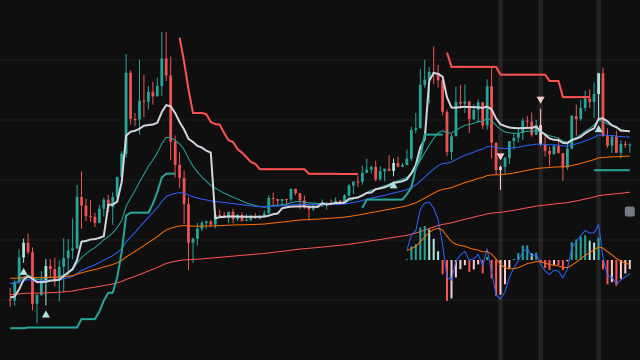
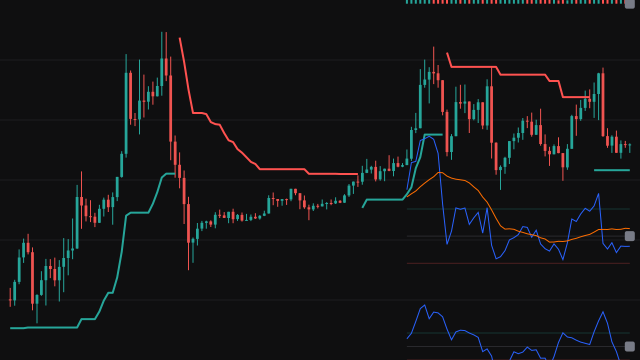
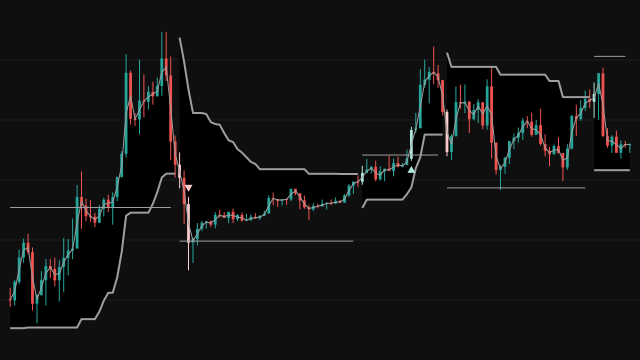
Note. The background shading is meant to cover signal bars among the newest Display Length bars, but a study cannot know in advance which bar will be the newest, so it counts whole chart intervals back from the chart's clock: on a market that closes, or when the clock is well past the newest bar, fewer bars are shaded, and where the chart supplies no clock none are.
This study stacks several familiar tools on the price chart and only marks a bar when they all point the same way. It draws four exponential moving averages (20, 50, 100 and 200 by default, each seeded with the simple mean of its first window), a VWAP or TWAP that restarts at the start of each anchor period (one day by default), and a Supertrend built from a 10-bar average true range at a factor of 3. MACD (3, 9, 15) and a Stochastic (5, 3, 3) are computed alongside and redrawn as small scaled panels inside the price pane over the most recent bars, together with a volume panel.
A long entry needs the close above the Supertrend and above the VWAP, %K above the oversold level and above %D, and the MACD line above zero, above its signal line and above its histogram. A short entry is the mirror image, with %K below the overbought level. Every enabled filter must also pass: a bar range larger than a multiple of ATR, a body that fills a set share of the bar, a body that passes that test on a bar whose range is at least a set multiple of the previous bar's range, volume above its average, relative volume above its multiplied average, and a clock window.
Two signal methods decide which entry bars are marked. Continuous Signals arms when MACD sits on the opposite side of zero and fires on the first full entry after that, then disarms. Flip Signals marks only the bar where the entry state changes from long to short or back.
How to read Option Buying Scalping Setup Scanner
A small triangle below a candle is a long signal and one above is a short signal; the candle itself is recoloured on that bar, and the background is shaded on signal bars among the most recent bars. Read the Supertrend colour and the side of the VWAP as the trend filter, and the mini panels as a quick look at momentum and volume without opening separate panes.
The panels are scaled into the price range of the recent bars, so their height means nothing in price terms: only their shape and crossings matter. Signals need every condition on the same bar, so they are deliberately rare, and in a choppy market they can still fire on both sides in quick succession. The study reads only the chart's own symbol; it does not scan a list of other symbols. Treat a mark as a setup to check, not as an order.
Settings
- Signal Method
- Continuous arms on an opposing MACD sign and fires on the next full entry; Flip marks only the bar where the long and short states change hands.
- Supertrend ATR Length
- Bars in the average true range that sets the Supertrend band width.
- Factor
- How many average true ranges the Supertrend sits from the bar's midpoint; larger values flip less often.
- EMA Display
- Show or hide the four exponential moving averages. They do not take part in the signals.
- Length 1
- Length of the fastest exponential moving average.
- Length 2
- Length of the second exponential moving average.
- Length 3
- Length of the third exponential moving average.
- Length 4
- Length of the slowest exponential moving average.
- VWAP / TWAP Display
- Show or hide the VWAP or TWAP line. The signals use it either way.
- Choose
- VWAP weights each bar's typical price by its volume; TWAP averages each bar's open, high, low and close equally, for symbols without volume.
- Anchor Timeframe
- When the average restarts: a bare number is minutes, 1D daily, 1W weekly, 1M monthly, 3M quarterly and 12M yearly.
- MACD Display
- Show or hide the MACD mini panel. The signals use MACD either way.
- Fast Length
- Length of the fast exponential mean in MACD.
- Slow Length
- Length of the slow exponential mean in MACD.
- Signal Smoothing
- Length of the exponential mean that forms the MACD signal line.
- MACD Vertical Offset
- How far below the recent low the MACD panel sits, as a multiple of the recent price range.
- MACD Height
- How tall the MACD panel is drawn, as a multiple of the recent price range.
- Stochastic Display
- Show or hide the Stochastic mini panel. The signals use the Stochastic either way.
- %K Length
- Bars in the high and low window the close is measured against.
- %K Smoothing
- Simple mean length that smooths the raw reading into %K.
- %D Smoothing
- Simple mean length of %K that forms %D.
- Over Bought
- A short signal needs %K below this level.
- Over Sold
- A long signal needs %K above this level.
- Stochastic Vertical Offset
- How far below the recent low the Stochastic panel sits, as a multiple of the recent price range.
- Stochastic Height
- How tall the Stochastic panel is drawn, as a multiple of the recent price range.
- Display Volume Average
- Draw the volume average as a line through the volume panel.
- Type
- Regular colours each volume bar by candle direction, Buying/Selling overlays the selling share in red, and None hides the volume panel.
- Volume Vertical Offset
- How far above the recent high the volume panel sits, as a multiple of the recent price range.
- Volume Height
- How tall the volume panel is drawn, as a multiple of the recent price range.
- Apply ATR Filter
- Keep a signal only when the bar's range is larger than the ATR times the multiplier.
- ATR Length
- Bars in the average true range the ATR filter compares against.
- ATR Multiplier
- How many ATRs the signal bar's range must exceed when the ATR filter is on.
- Apply Body % Filter
- Keep a signal only when the candle body fills at least the set share of the bar's range.
- Body % Above
- The share of the bar's range, in percent, the body must reach for the body filters.
- Apply Body Size Filter
- Keep a signal only when the body passes the body percent test and the bar's range is at least the multiplier times the previous bar's range.
- Body Size Multiplier (x)
- How many times larger than the previous bar's range the signal bar's range must be.
- Apply Volume Filter
- Keep a signal only when the bar's volume is above its simple average.
- Volume SMA Length
- Length of the volume average, used by the volume filter and by the line in the volume panel.
- Apply Relative Volume Filter
- Keep a signal only when relative volume is above its own average times the multiplier.
- Relative Volume Length
- Bars in the volume average that relative volume divides by, and in the average of relative volume itself.
- Rel Vol SMA Multiplier
- How many times its own average relative volume must reach when that filter is on.
- Apply Time Filter
- Keep signals only between the From and To times, read in the chart's timezone.
- Time From (hour)
- Hour at which the time window opens.
- Time From (minute)
- Minute at which the time window opens.
- Time To (hour)
- Hour at which the time window closes; a bar starting at this time is outside it.
- Time To (minute)
- Minute at which the time window closes.
- Display Length
- How many recent bars the mini panels cover and over which signal bars get a shaded background.
Frequently asked questions
Why do I see fewer signals with Continuous Signals than I expect?
In that mode a long signal first needs the MACD line below zero to arm, and fires on the first bar after that where every long condition holds. After it fires it disarms, so the next long signal needs MACD to dip below zero again.
What do the small panels inside the price chart show?
They are MACD, Stochastic and volume, rescaled into the price range of the most recent bars so they fit in the same pane. Their vertical position and height are set by the offset and height settings and carry no price meaning.
Do the moving averages affect the signals?
No. The four exponential averages are drawn for context only. The signals use the Supertrend, the VWAP or TWAP, MACD, the Stochastic and any filters you switch on.
Which clock does the time filter use?
The bar's opening time in the chart's timezone. A bar is kept when it starts at or after the From time and before the To time.