
Clean Signals: ExRem, Flip & No Repainting
Remove duplicate signals with ExRem, hold state with Flip, and delay one bar so your system never repaints.
- ·Why raw signals repeat
- ·ExRem to keep the first
- ·Flip for stateful holds
- ·Ref(-1) to avoid repainting
- ·SetTradeDelays
- ·ValueWhen for entry prices
At the end of the last chapter we built a working EMA system - and then admitted it was untidy. The signals were correct in spirit but repeated, and they fired on the current bar before that bar had even finished forming. Both problems can quietly wreck a backtest, making it look far better (or worse) than reality.
ExRem is short for "Excess Remove" - it strips repeated signals so only the first of each run survives. It is one of the most-used functions in any real AFL system.
This chapter is about turning rough signals into honest ones. Three small functions do almost all the work: ExRem removes duplicates, Flip remembers whether you are in a trade, and Ref(..., -1) delays a signal by one bar so it can only act on confirmed, closed data. Master these and your systems become both cleaner and trustworthy.
Why raw signals repeat
Picture a Buy array from a crossover. In a strong trend the cross happens once - fine. But in a choppy market the fast EMA can weave above and below the slow EMA, so Cross lights up on bar 12, bar 15, bar 19, and so on. Each of those is a fresh True.
The problem: after the first Buy you are already long. The engine ignores the extra Buy signals for entry purposes, but they still clutter your arrows, your alerts, and any logic that counts signals. Worse, if a stray Buy lands between an exit and the next real entry, your trade timing drifts. What you actually want is: one Buy, then nothing until a Sell, then nothing until the next Buy. Strictly alternating. That is exactly what ExRem gives you.
ExRem: keep the first, drop the rest
ExRem stands for "Excess Removal". You give it two arrays and it keeps only the first True in each run, blanking the repeats until the other array fires:
Buy  = Cross(Fast, Slow);
Sell = Cross(Slow, Fast);

// keep only the first Buy until a Sell appears, and vice-versa
Buy  = ExRem(Buy,  Sell);
Sell = ExRem(Sell, Buy);
Read ExRem(Buy, Sell) as: "let a Buy through, then ignore further Buy signals until a Sell has happened." The second line does the mirror for Sell. After this pair, the two arrays strictly alternate - Buy, Sell, Buy, Sell - which is precisely the rhythm a backtest expects.
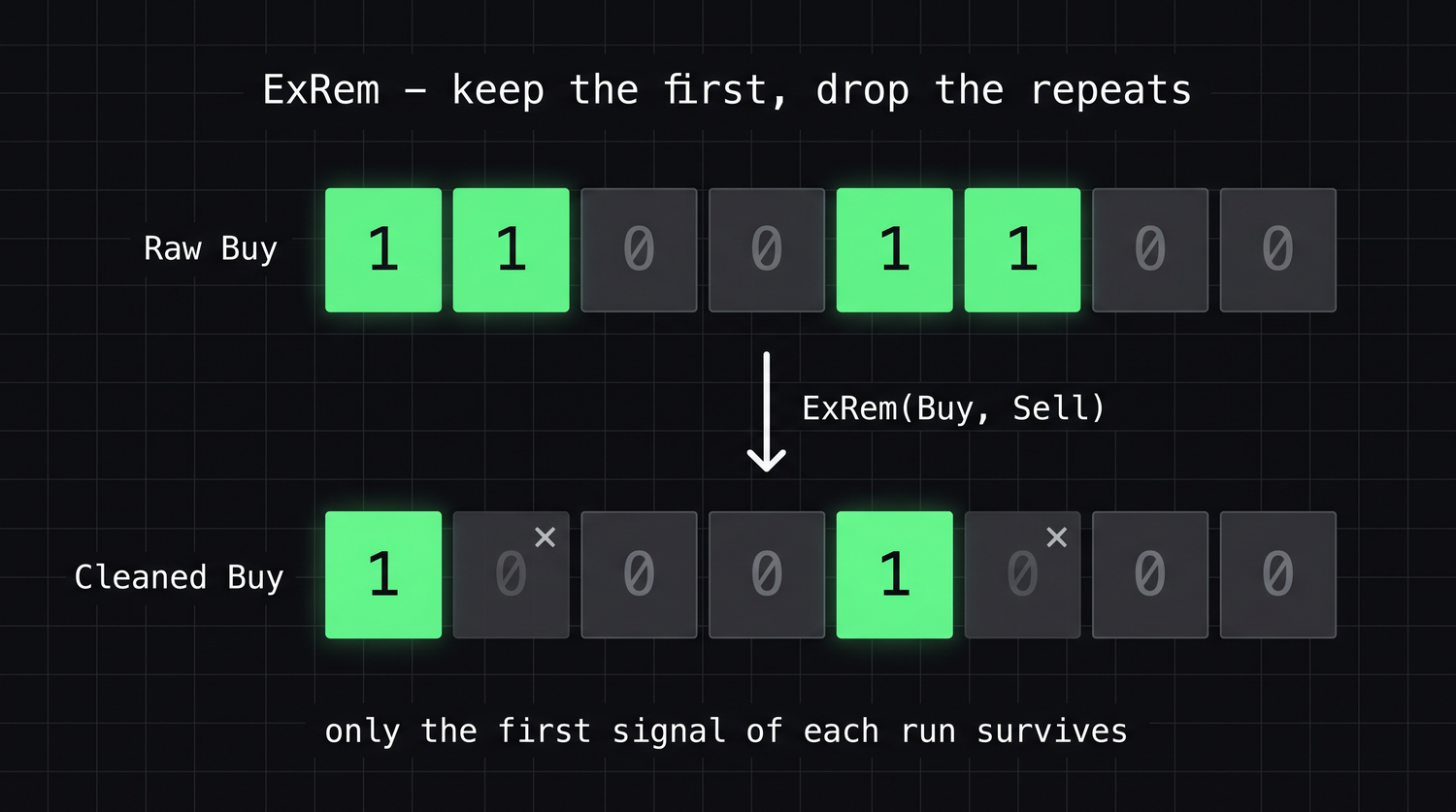
A reliable habit: write your raw signals first, then immediately clean them with a matching pair of ExRem lines. The author's own strategy files do this every single time - it is the difference between a chart full of noisy arrows and one clean arrow per trade.
See ExRem clean the signals
Here is a choppy stretch where the raw Buy and Sell arrays both fire more than once. Trace ExRem across it: it lets the first Buy through, then blanks every later Buy until a Sell has happened - and the mirror line does the same for Sell.
| Bar | 1 | 2 | 3 | 4 | 5 | 6 | 7 | 8 |
|---|---|---|---|---|---|---|---|---|
Buy (raw) |
T | T | F | F | T | T | F | F |
Sell (raw) |
F | F | T | F | F | F | T | T |
ExRem(Buy, Sell) |
T | · | · | · | T | · | · | · |
ExRem(Sell, Buy) |
· | · | T | · | · | · | T | · |
The repeated Buy on bar 2 vanishes because we are already long from bar 1; the repeated Sell on bar 8 vanishes for the same reason. What survives alternates perfectly - Buy (1), Sell (3), Buy (5), Sell (7) - which is exactly the clean rhythm a backtest needs.
Flip: a stateful "in position" array
ExRem cleans the signals. Sometimes you also want to know, at every bar, "am I currently in a trade?" That is a different question - it is about state between signals, not the signals themselves. Flip answers it:
inLong = Flip(Buy, Sell); // True from a Buy until the next Sell
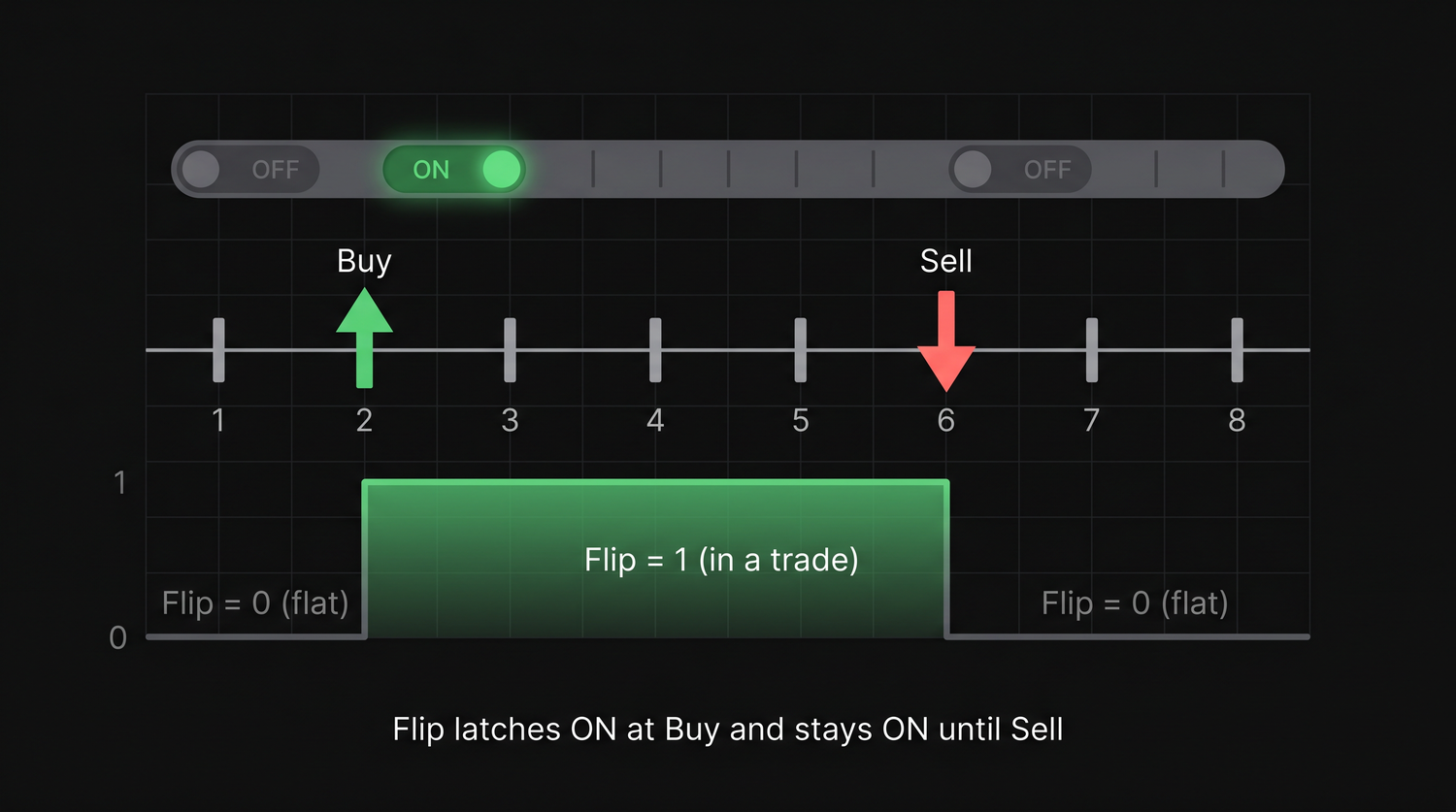
Flip(Buy, Sell) returns True starting on the Buy bar and stays True every bar until a Sell flips it back to False. It is like a latch: the first array switches it on, the second switches it off. This is enormously useful for drawing - you can plot a stop-loss line, shade the background, or show a target only while a trade is open:
// show the entry price as a line only while we hold the position
Plot(IIf(inLong, BuyPrice, Null), "Entry", colorGreen, styleDashed);
The author's Supertrend and stop/target formulas lean on Flip for exactly this - buycontinue = Flip(Buy, Sell) becomes the "trade is active" flag that gates every on-chart level.
ExRem and Flip are cousins. ExRem(Buy, Sell) gives you the edges - the single bar a trade starts. Flip(Buy, Sell) gives you the fill - every bar the trade is alive. Use ExRem for entries and exits; use Flip for "while in trade" plotting and status.
See Flip hold the state
Using the cleaned signals from above - Buy on bars 1 and 5, Sell on bars 3 and 7 - watch Flip latch on at each Buy and stay on every bar until the next Sell resets it:
| Bar | 1 | 2 | 3 | 4 | 5 | 6 | 7 | 8 |
|---|---|---|---|---|---|---|---|---|
Buy |
T | · | · | · | T | · | · | · |
Sell |
· | · | T | · | · | · | T | · |
Flip(Buy, Sell) |
1 | 1 | 0 | 0 | 1 | 1 | 0 | 0 |
Where ExRem gave you two lonely True bars per trade (the edges), Flip fills the whole stretch between them with 1s. That run of 1s is your "in a trade right now" flag - perfect for shading the background or showing a stop only while the position is open.
Repainting, and the one-bar delay that fixes it
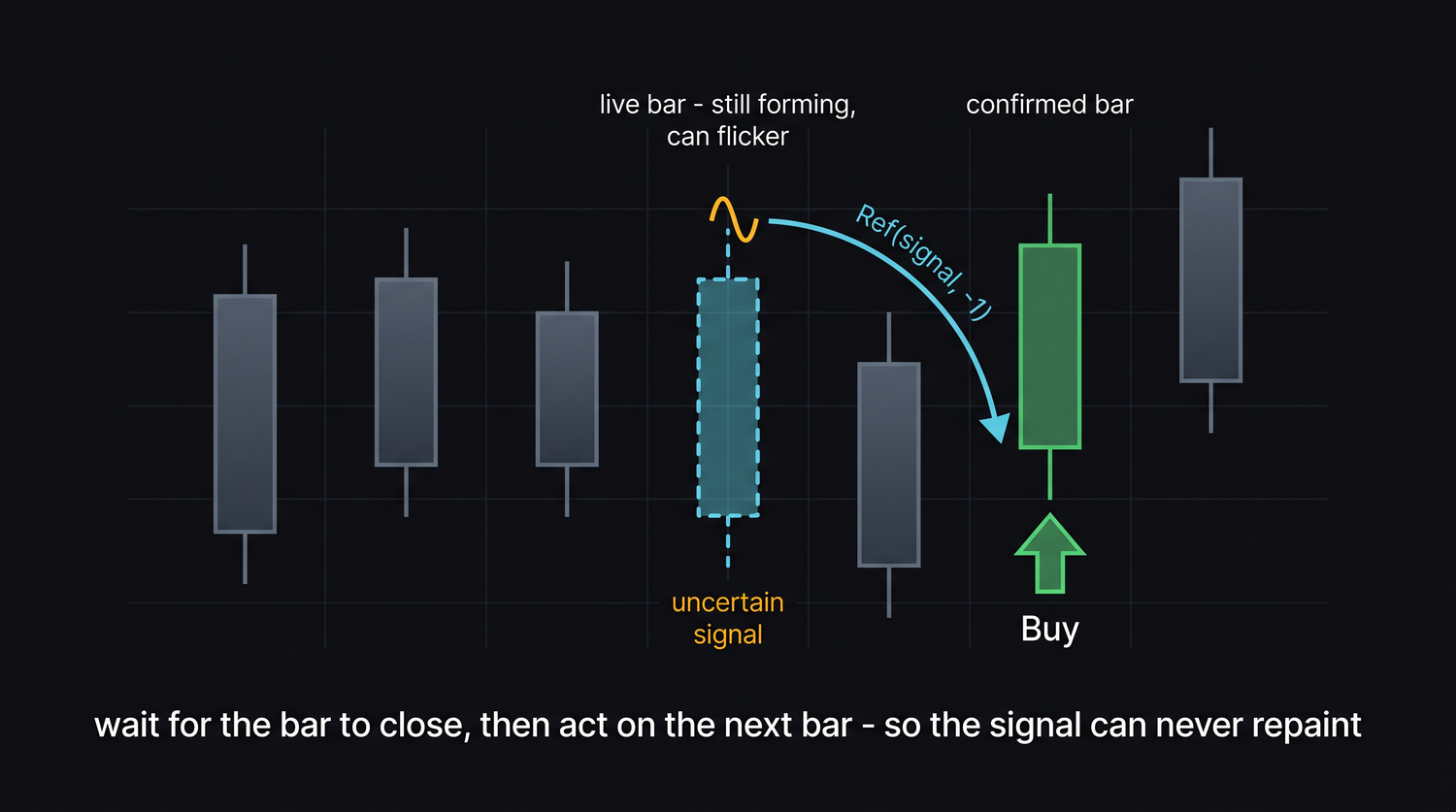
Now the most important idea in the chapter. A live, forming bar has no final close yet - its high, low and close are still moving. A signal like Cross(Fast, Slow) is computed from the close, so on the current unfinished bar it can appear, vanish, and reappear as price wiggles. A signal that changes its mind after the fact is said to repaint - and a backtest built on repainting signals is lying to you, because in reality you could never have acted on a signal that only existed momentarily.
The fix is simple and bulletproof: act on the previous, fully closed bar. Ref(array, -1) shifts an array back by one bar, so "yesterday's signal" becomes today's instruction:
Buy  = Cross(Fast, Slow);
Sell = Cross(Slow, Fast);

// confirm on the close: only act on a signal the PREVIOUS bar produced
Buy  = Ref(Buy,  -1);
Sell = Ref(Sell, -1);

// then remove duplicates as before
Buy  = ExRem(Buy,  Sell);
Sell = ExRem(Sell, Buy);
Because the previous bar is finished and can never change, a delayed signal is non-repainting. You give up acting on the very bar of the cross, but you gain honesty: the backtest now reflects trades you could genuinely have taken.
Pairing the delay with SetTradeDelays
Here is the part beginners get wrong. AmiBroker has its own delay setting, SetTradeDelays, which can postpone fills by a number of bars. If you delay the signal yourself with Ref(..., -1) and leave AmiBroker's delay on, you delay twice - a hidden double-lag.
So when you do the manual one-bar delay, switch AmiBroker's delays off and let your code be the single source of truth:
SetTradeDelays(0, 0, 0, 0); // no extra engine delay; our Ref(-1) is the delay
The four zeros are the delays for Buy, Sell, Short, Cover respectively. With them at zero and a manual Ref(..., -1), the signal is decided on the bar's close and executed at the next bar - which leads neatly to the entry price.
Choose one delay mechanism, never both. Either delay the signal in code with Ref(..., -1) and set SetTradeDelays(0,0,0,0), or keep signals on the cross bar and let SetTradeDelays(1,1,1,1) do the postponing. Mixing them silently shifts every fill an extra bar and quietly distorts the whole report.
ValueWhen: locking in the entry price
Since the order now executes on the bar after the signal, the honest fill is that next bar's open. ValueWhen captures it. ValueWhen(Buy, Open) reads the value of Open on the most recent Buy bar and holds it forward:
BuyPrice   = ValueWhen(Buy,   Open);
SellPrice  = ValueWhen(Sell,  Open);
ShortPrice = ValueWhen(Short, Open);
CoverPrice = ValueWhen(Cover, Open);
Because Buy was already delayed by one bar, the Open it points to is the open after the cross - exactly the price a real trader could have filled at. This is the standard, non-repainting recipe straight from the author's 10 and 20 EMA Crossover.afl: delay with Ref, clean with ExRem, price with ValueWhen, and zero out SetTradeDelays.
See ValueWhen hold the price
ValueWhen(condition, array) reaches back to the most recent bar where condition was true, reads array there, and holds that value forward until the next event. Trace ValueWhen(Buy, Open): it grabs the open on each Buy bar and keeps it steady in between - which is exactly what "the price I entered at" should do.
| Bar | 1 | 2 | 3 | 4 | 5 | 6 |
|---|---|---|---|---|---|---|
Buy |
F | T | F | F | T | F |
Open |
100 | 102 | 101 | 105 | 104 | 108 |
ValueWhen(Buy, Open) |
– | 102 | 102 | 102 | 104 | 104 |
At bar 2 a Buy fires and ValueWhen locks in that bar's open, 102. It holds 102 across bars 3 and 4 - no new Buy, so nothing changes - until bar 5's Buy refreshes it to 104. The dash on bar 1 is the familiar "no event yet" gap, before any Buy has happened.
Try it yourself
- Plot the raw
Buy/Sellarrows, then add theExRempair and Apply again. Count the arrows before and after on the same chart. - Add
inLong = Flip(Buy, Sell)and plotIIf(inLong, BuyPrice, Null)- watch the entry line appear only while a trade is open. - Toggle the
Ref(..., -1)lines off and on while watching the most recent (forming) bar. See how the un-delayed arrow can flicker as price moves. - Deliberately set
SetTradeDelays(1,1,1,1)and keepRef(..., -1), then run a quick backtest. Notice every entry now sits one bar later than you intended.
Recap
- Raw crossover signals repeat in choppy markets;
ExRem(Buy, Sell)keeps only the first of each run so entries and exits strictly alternate. Flip(Buy, Sell)is a stateful latch -Truefor every bar a trade is open - ideal for "while in trade" plotting.- A signal that changes after the bar closes is repainting;
Ref(signal, -1)acts on the previous, finished bar and is therefore non-repainting. - Pair the manual delay with
SetTradeDelays(0,0,0,0)so you never delay twice. ValueWhen(Buy, Open)locks in the honest next-bar-open entry price.
Next, we protect those clean trades with stops and targets - drawing them on the chart and enforcing them in the backtest with ApplyStop.