
Dates, Times & the Trading Session
Read the calendar and the clock - Day, Month, time-of-day - and answer the question every intraday system asks: has a new day started?
- ·Day / Month / Year / DayOfWeek
- ·TimeNum & the HHMMSS clock
- ·Detecting a new day or session
- ·Bars since the open; first & last bar of the day
- ·The day's open, high & low so far
- ·Restricting entries to a time window
Every intraday system, sooner or later, has to ask two very human questions: what time is it? and did a new day just start? A breakout strategy needs to know the market only opened a few minutes ago. A square-off rule needs to fire at 15:15, not before. A VWAP resets at the bell every morning. None of that is possible until your formula can read the calendar and the clock - and that is exactly the toolkit we build in this chapter.
In the last chapter you learned to look back with Ref, count with BarsSince, and avoid peeking at the future. Here we put those skills to work on time itself. Everything that follows is still pure array thinking from Chapter 3 - each function below hands you a whole column, one value per bar - we are just filling those columns with dates and times instead of prices.
AmiBroker stores every intraday bar's timestamp down to the second. That is why your formula can read the exact clock - TimeNum() knows the difference between 09:15:00 and 09:15:01. On end-of-day data there is no meaningful intraday time, so these clock functions only come alive on intraday charts.
The calendar functions
AmiBroker gives you a small family of functions that read the date of each bar. Each one returns an array - a column with one whole number per bar:
d  = Day();        // day of the month, 1 to 31
m  = Month();      // month, 1 to 12
y  = Year();       // four-digit year, e.g. 2026
dw = DayOfWeek();  // 0 = Sunday, 1 = Monday ... 6 = Saturday
dy = DayOfYear();  // day of the year, 1 to 366
DayOfWeek() is the handy one for Indian markets: the NSE trades Monday to Friday, so its values run 1 to 5. Want to skip Mondays for some reason? DayOfWeek() != 1. Want only the expiry-day weekday? Test against the right number. Because these are arrays, you combine them with the comparisons and AND/OR from Chapter 8 exactly like any price array.
The clock: TimeNum and DateNum
For the time of day, TimeNum() is the workhorse. It returns the bar's time packed into a single whole number as HHMMSS:
| Clock time | TimeNum() |
|---|---|
| 09:15:00 | 91500 |
| 09:30:00 | 93000 |
| 14:30:00 | 143000 |
| 15:30:00 | 153000 |
Because it is just a number, you compare it the obvious way: TimeNum() >= 91500 is true from the opening bar onward, and TimeNum() < 143000 is true before 2:30 pm. (Note 09:15 packs to 91500, not 091500 - the leading zero is just a digit, the value is ninety-one thousand five hundred.)
Its sibling DateNum() packs the date into one number using the formula (Year - 1900) * 10000 + Month * 100 + Day. So 26 June 2026 becomes (126 * 10000) + (6 * 100) + 26 = 1260626. You rarely read that number by eye; its job is to give each calendar day a unique value, perfect for equality and new-day tests.
Two more to know in passing: Now() returns the current real date-time (useful for "is this the latest bar?" checks), and Interval() returns the bar size in seconds - 60 for a 1-minute chart, 300 for 5-minute, 86400 for daily. Handy when one formula must adapt to different timeframes.
These are intraday tools. On end-of-day data, TimeNum() has no real meaning (every bar is just "the day"), so any logic built on it will misbehave. Always apply the formulas in this chapter to intraday charts - a 1, 3, 5 or 15-minute NIFTY, BANKNIFTY or RELIANCE chart.
Has a new day started? The backbone idea
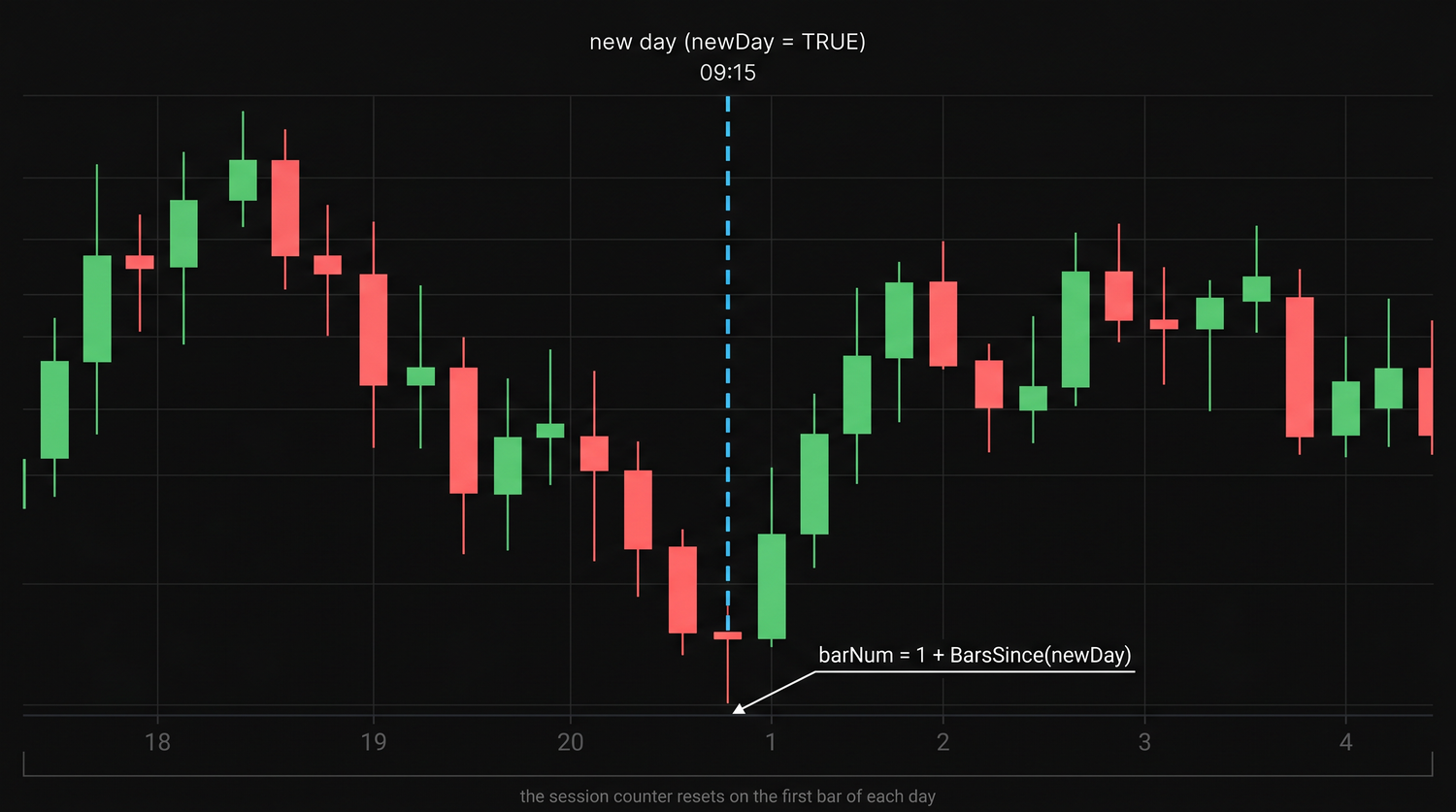
Here is the single most important line in all of intraday AFL. We want a true/false array that is True on the first bar of each session and False everywhere else. The trick: compare each bar's day number with the previous bar's, using Ref from the last chapter.
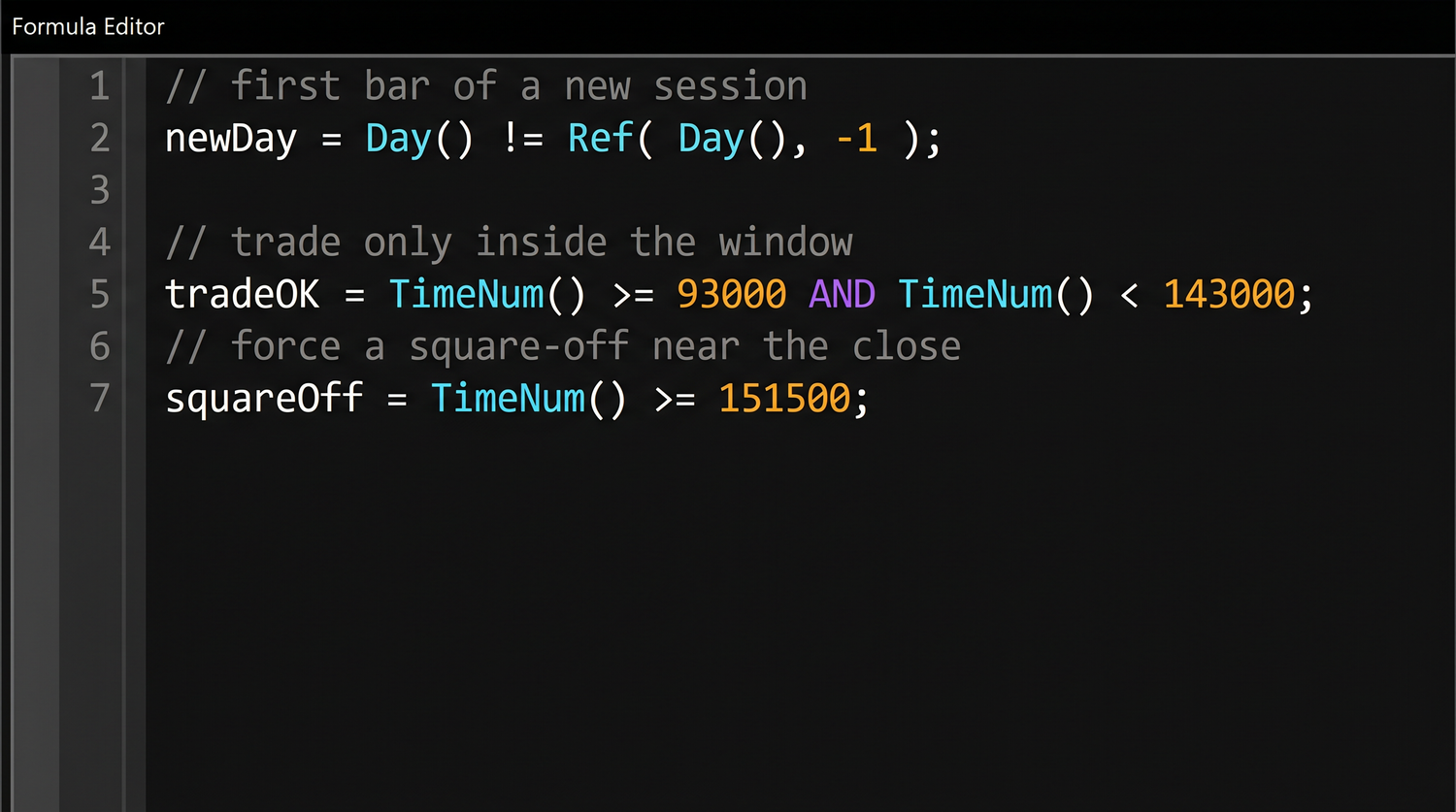
newDay = Day() != Ref(Day(), -1); // True on the first bar of each session
On the first bar of a new day, Day() differs from Ref(Day(), -1) (yesterday's value), so the comparison is True. On every other bar they match, so it is False. You could write the identical idea with DateNum() != Ref(DateNum(), -1) - and that version is safer across month boundaries, since the day-of-month number alone repeats every month.
Let us see it happen. Below are six consecutive 5-minute bars straddling the close of one session and the open of the next. Watch newDay and barNum reset the instant the date rolls over:
| Bar | Time | Day() | newDay | barNum |
|---|---|---|---|---|
| 0 | 15:20 | 25 | F | 73 |
| 1 | 15:25 | 25 | F | 74 |
| 2 | 15:30 | 25 | F | 75 |
| 3 | 09:15 | 26 | T | 1 |
| 4 | 09:20 | 26 | F | 2 |
| 5 | 09:25 | 26 | F | 3 |
The chart's bar index keeps marching on, but the moment Day() jumps from 25 to 26, newDay fires T and our session counter snaps back to 1. That reset is the heartbeat of every intraday formula.
newDay = Day() != Ref(Day(), -1); is the one line to memorise. It marks the first bar of each session, and almost everything else intraday - VWAP, opening range, the day's high - is built on top of it.
Bars into the session, first and last bar
Once you can spot the new day, counting bars into the session is one step away with BarsSince:
barNum = 1 + BarsSince(newDay); // 1 on the opening bar, 2, 3, ... through the day
The first bar of the day is simply newDay itself (or barNum == 1). The last actionable bar is best identified by its clock time - TimeNum() == 152000 for the 15:20 bar on a 5-minute chart, or whatever your chosen close is.
Do not try to find the last bar with Ref(Day(), 1) - that reaches one bar into the future to ask "is tomorrow a different day?". That is look-ahead bias (Chapter 9): in a backtest it cheats, and in real trading bar +1 does not exist yet. Identify the session's final bar by its clock time, never by peeking ahead.
The day's open, high and low so far
Three more functions, all session-aware once you feed them newDay. ValueWhen grabs a value at the last time a condition was true; HighestSince and LowestSince track an extreme since a condition last fired:
dayOpen = ValueWhen(newDay, Open);     // today's opening price, held all day
dayHigh = HighestSince(newDay, High);  // highest High since the session began
dayLow  = LowestSince(newDay, Low);    // lowest Low since the session began
Trace the morning of a RELIANCE 5-minute chart and watch dayHigh ratchet up while dayLow holds the session low:
| Bar | Time | High | Low | newDay | dayHigh | dayLow |
|---|---|---|---|---|---|---|
| 0 | 09:15 | 1422 | 1416 | T | 1422 | 1416 |
| 1 | 09:20 | 1425 | 1420 | F | 1425 | 1416 |
| 2 | 09:25 | 1424 | 1419 | F | 1425 | 1416 |
| 3 | 09:30 | 1430 | 1426 | F | 1430 | 1416 |
dayOpen stays pinned to the 09:15 open all day; dayHigh only ever rises; dayLow only ever falls - until the next newDay resets all three. As an alternative for the open, TimeFrameGetPrice("O", inDaily) reads the daily bar's open directly - the same number, fetched from the higher timeframe.
Restricting entries to a time window
Most intraday traders avoid the first chaotic minutes, stop opening fresh positions after a cut-off, and square off well before the bell. Two true/false arrays express all of that:
tradeWindow = TimeNum() >= 93000 AND TimeNum() < 143000;  // entries only 09:30-14:30
squareOff   = TimeNum() >= 151500;                        // force flat from 15:15
Now gate a system with them. Here is a short, complete intraday skeleton - it detects the new day, computes the day's open, only allows a long inside the window, and forces an exit at square-off:
// --- A session-aware intraday skeleton (intraday data only) ---

newDay  = Day() != Ref(Day(), -1);      // first bar of each session
dayOpen = ValueWhen(newDay, Open);      // today's open, held all day

tradeWindow = TimeNum() >= 93000 AND TimeNum() < 143000;
squareOff   = TimeNum() >= 151500;

// example rule: long while price is above the day's open, inside the window
Buy  = Close > dayOpen AND tradeWindow;
Sell = squareOff;                       // exit purely on time

// keep just the first entry, and one clean exit at square-off
Buy  = ExRem(Buy, Sell);                // ExRem = "remove excess"; more in Module E
Sell = ExRem(Sell, Buy);
That is a genuinely tradable shape: no entries before 09:30, none after 14:30, and a guaranteed flat position by 15:15. Swap the Buy rule for a VWAP cross or an opening-range breakout and the time scaffolding stays exactly the same.
Build the clock numbers as named variables at the top of every intraday formula - startTime = 93000;, exitTime = 151500;. It reads better than scattering raw 93000s through your code, and changing your session window becomes a one-line edit. Test it all first in sandbox trading (analyzer mode in OpenAlgo) before anything touches the exchange.
Try it yourself
- Apply
Plot(newDay, "newDay", colorRed, styleHistogram);to a 5-minute chart and confirm the histogram spikes to 1 only at 09:15 each morning. - Plot
dayHighanddayLowas lines and watch them form a widening box around each session that resets every day. - Add
Title = StrFormat("Bar %g of the day, time %g", barNum, TimeNum());and hover across a day boundary to see the counter reset. - Change
tradeWindowto your own hours and observe how the allowed entry zone moves.
Recap
Day(),Month(),Year(),DayOfWeek()(NSE = 1-5) andDayOfYear()each return a whole array of calendar values, one per bar.TimeNum()packs the clock as HHMMSS (09:15 ->91500), so you compare it directly;DateNum()gives each date a unique number.newDay = Day() != Ref(Day(), -1);marks the first bar of each session - the backbone of all intraday logic.barNum = 1 + BarsSince(newDay)counts bars into the day; find the last bar by clock time, never byRef(Day(), 1)(look-ahead).ValueWhen,HighestSinceandLowestSincefed withnewDaygive the day's open, high and low so far.- A
tradeWindowplus asquareOfftime turn any signal into a disciplined intraday system - and remember, these tools need intraday data.
Next, we meet the rare cases where array thinking is not enough - and learn to write a clean, correct for-loop in Arrays vs Loops: the for-loop.