
Reading an error
How an OpenScript diagnostic is laid out in the /trading editor (its code, severity, message, cause and fix), when each kind is found, and the nine code ranges that say what kind of problem it is.
On this page
Every time you open or save a script in /trading, the compiler checks it and reports what it found as diagnostics: numbered errors and warnings, each tied to a line of your script. This page shows how to read one, where each part comes from, and what the code alone tells you before you read another word. It applies to every script written in OpenScript (also called OpenAlgo Script), study or strategy, and it ends with the nine code ranges and the page that documents each one.
A diagnostic in the console
Here is a small RSI study with a slip on its last line. It computes the RSI into r, then plots a second RSI whose length is misspelt: lenght where the input is called len.
// RSI with overbought and oversold levels, drawn in its own pane.
version 1

study("RSI", precision = 2, range = [0, 100])

len = input(14, "Length", min = 2, max = 200)
r = rsi(close, len)

level(70, "Overbought", fade(red, 40))
level(50, "Middle", fade(gray, 60))
level(30, "Oversold", fade(lime, 40))

plot(rsi(close, lenght), "RSI", purple, width = 2)
Press Ctrl+S. The status bar at the bottom of the panel turns red and reads "1 error, so it will not run yet", and the console button at its left end shows 2. Click that button to open the console, the drawer under the editor, and it lists the two diagnostics, a warning and then an error:
OS8010  line 7, column 1
r = rsi(close, len)
^
r is assigned at line 7 and never read.
Fix: Use the value, or delete the line.

OS2001  line 13, column 17
plot(rsi(close, lenght), "RSI", purple, width = 2)
                ^^^^^^
lenght is not defined at this point in the file.
Fix: Assign lenght above this line, move this line below its assignment, or correct the spelling to len.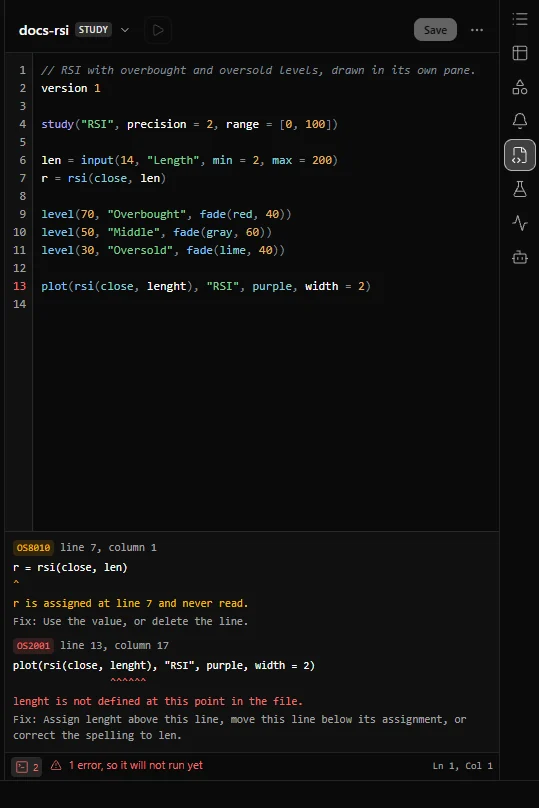
The screenshot shows this script in the Scripts panel with the console open. The number of the line with the first error, 13, is red in the gutter, so you can find the line without counting.
The two diagnostics point at one slip. The script already holds the RSI in r, so the fix for both is to plot r. Save the corrected script below and the status bar reads "Ready", the console says "Nothing to report.", and the study can go on the chart:
// RSI with overbought and oversold levels, drawn in its own pane.
version 1

study("RSI", precision = 2, range = [0, 100])

len = input(14, "Length", min = 2, max = 200)
r = rsi(close, len)

level(70, "Overbought", fade(red, 40))
level(50, "Middle", fade(gray, 60))
level(30, "Oversold", fade(lime, 40))

plot(r, "RSI", purple, width = 2)
The parts of a diagnostic
The console shows the first five parts below for every diagnostic. The last two, the cause and the stage, are on the code's entry in these pages.
| Part | In the example | What it tells you |
|---|---|---|
| Code | OS2001 | What kind of problem this is. The same mistake carries the same code in every release |
| Position | line 13, column 17 | Where the problem starts. The carets (^) under the copy of your line mark the exact characters |
| Message | lenght is not defined at this point in the file. | What went wrong, with the names and values from your script filled in |
| Fix | Assign lenght above this line, ... | What to change. Every diagnostic names a concrete action on your source |
| Severity | Error, shown in red | Whether it stops the script. An error does; a warning, shown in amber, never does |
| Cause | Under "What it means" on the code's entry | Why the rule exists and what usually leads to it, with a before and after example |
| Stage | check, a badge beside the code | When the problem was found, and so whether anything ran before it |
Three details make the parts easier to use.
- The message is a template. The error catalogue, the list of every code the language defines, stores each message with blanks, such as
{name} is not defined at this point in the file., and the compiler fills the blanks from your script. The console always shows the filled message. The range pages show the template, with each blank written as the word that names it. - The fix is yours to apply. It names the replacement, the line to move or the call to wrap. The /trading editor shows it as text and never changes your script by itself.
- A suggested name is the closest match, not a certainty. When a fix offers a spelling, such as "correct the spelling to len", the compiler picked the known name nearest to what you typed. For a typo it is usually right. For a name that is simply wrong it is a guess, so read it before you take it.
Errors and warnings
| Error | Warning | |
|---|---|---|
| Codes | OS1xxx to OS7xxx, and the errors of OS9xxx | OS8xxx, and the warnings of OS9xxx |
| Colour in the console | Red | Amber |
| Status bar | "1 error, so it will not run yet" | "Ready, with 1 warning" |
| Stops the script | Yes. A script with a compile error cannot be applied to the chart or backtested. An error raised while a bar runs stops the script on that bar | Never |
| What to do | Fix it and save again | Read it. It describes code that runs and is almost never what you meant |
A script with errors is still saved when you press Ctrl+S, so nothing you typed is lost. It has no compiled program until it compiles, though, so it cannot be applied to a chart, backtested or deployed until the errors are fixed and it is saved again. See The editor for the console, the status bar and saving.
Warnings are documented on OS8xxx Warnings. Two worth meeting early are OS8001, a stateful call (one that keeps its own state from bar to bar, such as ema()) inside an if, and OS8010, a name assigned and never read.
The OS9xxx range holds both kinds. It belongs to the importer, which turns a script written in another chart language into OpenScript, and its findings never appear in the /trading console. See OS9xxx Import.
The stage: when a problem is found
Every code belongs to one stage, shown as a badge beside it on the range pages. The stage says how far the script got before the problem was found. The engine is the part of OpenScript that runs a compiled script bar by bar, and the host is the application that feeds it, which on the /trading page is OpenAlgo.
| Stage | What is happening | Codes raised here | Where you see it |
|---|---|---|---|
lex | Reading the characters of the file | Part of OS1xxx | The console, when you open or save the script |
parse | Reading statements, blocks and brackets | Most of OS1xxx, and one OS5xxx limit | The console, when you open or save the script |
check | Names, types, scope and how each call is written, before any bar runs | OS2xxx, OS3xxx, OS8xxx, and a few OS6xxx and OS7xxx | The console, when you open or save the script |
runtime | Running one bar | OS4xxx, and parts of OS5xxx, OS6xxx and OS7xxx | When the script runs, on the chart or in a backtest |
host | The host answering the engine: data, budgets and order destinations | Most of OS6xxx, and parts of OS5xxx and OS7xxx | Mostly when the script is loaded or runs. OS6018 can also appear in the console |
import | Reading a script written in another chart language and writing it as OpenScript | OS9xxx | In the findings the library's importer returns, never in the /trading console |
The first three stages finish before the first bar. An error there means nothing ran and nothing was drawn, and it costs you one edit. The language moves as many mistakes as it can into those stages: a study that calls buy() is refused at check with OS7001, so it can never place an order on any bar, and a table written with 2.5 rows is refused at check with OS3004.
A runtime error depends on the data. The same script can run cleanly on one NSE stock and stop on bar 30,000 of another. When it happens, the script stops on that bar: the bar's work is undone and no later bar runs. The engine never skips the bar and carries on, because a gap that nobody explains looks exactly like a gap the script meant.
A runtime error is not in the console, which reports what the compiler found when you saved, and it is not written on the chart either. On the /trading page:
- When you add a study that stops, a notice shows the code, the message and the fix.
- The Objects panel on the right-hand toolbar lists the study with the status Error. That is also where to look when a study already on the chart stops later, for example when a new bar arrives.
Debugging shows how to make values visible and find the first bar where a script goes wrong.
The nine ranges
The first digit after OS says which kind of problem the diagnostic describes. It does not say how serious it is: that is the severity.
| Range | Kind | Covers | Severity | Codes |
|---|---|---|---|---|
| OS1xxx | Syntax | The text is not a program: characters, layout and grammar | Error | 29 |
| OS2xxx | Names and types | The program parses, and a name or a type does not work out | Error | 20 |
| OS3xxx | Arguments | A call or an option is wrong where it is written | Error | 26 |
| OS4xxx | Runtime | A bar produced a value the engine cannot act on | Error | 13 |
| OS5xxx | Limits | A budget ran out: loops, memory, size or time | Error | 10 |
| OS6xxx | Data | Bars, instruments, timeframes and the answers to data requests | Error | 25 |
| OS7xxx | Orders | An order could not be placed as written | Error | 19 |
| OS8xxx | Warnings | The script compiles and runs, and something in it is probably not meant | Warning | 19 |
| OS9xxx | Import | A script written in another chart language could not be translated as written, or was translated with a stated difference | Error or warning | 12 |
Version 0.8.1 catalogues 173 codes. What each range means for your next move:
- OS1xxx Syntax errors. Something in the text is not part of the language: a tab in the indentation, a semicolon,
&&forand, a bracket that is never closed. Nothing has run. The fix is on the line reported, or on the line where the bracket or block it names was opened. - OS2xxx Names and types. The text is a program and its meaning does not work out: a name read before it is assigned or misspelt, a name declared twice, a number added to a string,
[]on a value that keeps no history. Nothing has run. - OS3xxx Arguments. A call is wrong where it stands: too many arguments, an unknown argument name, a
plotinside anif, a per-bar value or arithmetic on an input in a setting that is fixed before the first bar. Nothing has run. - OS4xxx Runtime errors. A bar ran and produced something the engine cannot act on: an array index past the end, a history index that is not a whole number, a change to a drawing that was already deleted. This is the first range that depends on the data.
- OS5xxx Limits. A budget ran out: loop iterations on one bar, the size of an array, the size of the compiled program, the time one bar may take. Limits lists every budget.
- OS6xxx Data. The data is not what the script asked for: an unknown timeframe, a request finer than the chart, an instrument or exchange OpenAlgo does not know, bars out of order.
- OS7xxx Orders. An order could not be placed as written: an absent price, a quantity of zero, a price that is not on the instrument's tick, a bracket on the wrong side of the entry.
- OS8xxx Warnings. The script runs. Read them anyway.
- OS9xxx Import. You imported a script written in another chart language with the library's importer, and this is its report on the translation. An error marks a statement kept as a comment, which you translate by hand; a warning marks a statement translated with a difference in meaning that the message states, which you check against the original. You never meet these when you save a script in /trading, which does not offer the importer. Importing a script walks through the whole process.
Numbers inside a range are given out in the order codes were added, not grouped by topic, and a code is never renumbered or reused. Searching for OS2001 finds the same explanation in this release and in every later one. The range pages group related codes under headings so you can read them by topic.
Working through a list of diagnostics
Start with the earliest line. One slip often produces several messages. This fragment is missing one ) on its first line:
x = max(close,
    open
plot(x, "X")
Pasted under a declaration, it gives five errors and a warning. The bracket is never closed (OS1012), so the compiler reads the plot line as more of the same statement: a continuation line that is not indented (OS1028), a third argument with no comma before it (OS1014), a max call with three arguments (OS3001), and an x read before its assignment has finished (OS2001). With no separate plot line left, x is never read either, which is the warning (OS8010). Close the bracket and all six go away.
Fix, save, read again. The editor checks when you save, not while you type, so after each fix press Ctrl+S and read the console afresh. Later messages often vanish with an earlier one.
Fix errors first, then read the warnings. A warning never stops the script, but each one describes code that is almost always a mistake.
OS6018 beside another error. In version 0.8.1 a few check errors, such as OS3003, OS3025 and OS2005, bring OS6018 ("The compiled program is malformed") onto the same line. Its message is long and technical; you can ignore it. Fix the other error and OS6018 goes with it.
OS6018 on its own. Its message then says the fault is in the compiler and asks you to report it together with the script. The /trading page in current OpenAlgo releases still runs library 0.5.0, which reports a setting that does arithmetic on an input, such as precision = input(2, "Decimals") + 1 or width = w + 1 where w is an input, with OS6018 alone. Version 0.8.1 reports it as OS3025, with OS6018 beside it. Either way, pass the input on its own and put the arithmetic in its default: precision = input(3, "Decimals").
Look up the code. Every code is on its range page with its message, a plain explanation of what usually causes it, the fix, and a before and after example. The before block is the shortest code that raises the code. It may use names such as fast, trending or a function band that a real script would define above it, so pasted on its own it also reports OS2001 for those names. The after block is the same code, fixed. For problems described by what you see rather than by a code, use Troubleshooting.
Specific codes and broader codes
Some codes take one case away from a broader code so that their fix can be precise. A condition that is a number could be reported as a general type mismatch, but it has its own code, OS2011, whose fix tells you to write the test out. The broader code still covers every other case.
| Code | Takes this case | From |
|---|---|---|
| OS1005 | An unknown escape sequence in a string | OS1004 |
| OS1027 | A colour literal that is not six or eight hexadecimal digits, such as #fff | OS1001 |
| OS1028 | A continuation line that is not indented past its statement | OS1003 |
| OS1029 | A name written against a number, such as 2fast | OS1001 |
| OS2011 | A condition that is not a bool | OS2003 |
| OS2012 | Ternary arms of different types | OS2003 |
| OS2013 | An array literal that mixes types | OS2003 |
| OS2019 | A type that cannot be an array element | OS2016 |
| OS2020 | A name that is planned and not implemented yet | OS2001 |
| OS3019 | A plot handle where a drawing object belongs | OS3011 |
| OS3020 | Something other than two plots passed to fill() | OS3011 |
| OS3022 | An input whose title is another input's name | OS3017 |
| OS3023 | An order that names a leg in a file with no legs | OS3008 |
| OS3024 | An input written in place with an empty title | OS3021 |
Related. The editor, Debugging, Troubleshooting, Limits, Glossary