
FAQ
Short answers to the questions people ask first about OpenScript, each with a link to the page that answers it in full.
On this page
This page answers the questions that come up in your first week with OpenScript, also called OpenAlgo Script. Each answer is short on purpose and ends with a link to the page that explains it properly. If a word in an answer is new to you, the Glossary defines it.
Getting started
What is OpenScript?
An open trading language for writing a study (an indicator that draws on the chart) or a strategy (a study that also places orders) once, then plotting it, backtesting it and trading it with the same numbers in all three places. It runs in the /trading page of OpenAlgo, and it is also published as two Apache 2.0 libraries: openalgo-script on npm for JavaScript and TypeScript, and openscript on PyPI for Python. See Introduction.
What does a script look like?
This is a complete study. It draws two moving averages over the price and marks the bar where the fast one crosses above the slow one. It works on any instrument and any interval.
version 1
study("EMA cross", overlay = true, precision = 2)

fastLen = input(9, "Fast length", min = 1, max = 500)
slowLen = input(21, "Slow length", min = 1, max = 500)

fast = ema(close, fastLen)
slow = ema(close, slowLen)

plot(fast, "Fast", aqua, width = 2)
plot(slow, "Slow", orange, width = 2)

if crossUp(fast, slow)
    signal("BUY", lime, at = "below", shape = "arrowUp")
Twelve complete scripts, from this one to an options premium strategy, are on Example scripts.
Do I need to install anything?
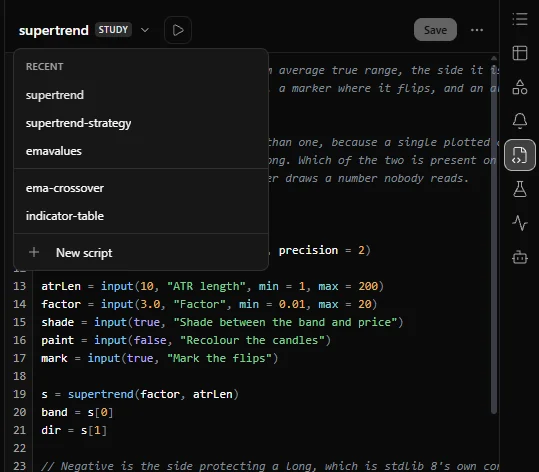
Not to use it in OpenAlgo. Open the /trading page, open the Scripts panel and start a new script. The compiler runs in your browser, and there is no build step between saving a script and putting it on a chart. To run OpenScript inside your own application you install one of the two libraries. See Quickstart and Two libraries.
Where do I start reading?
Quickstart, then Your first strategy. When you want the rules rather than the tour, read Execution model and Absent values: those two pages explain most of the language.
How do I see what is wrong with my script?
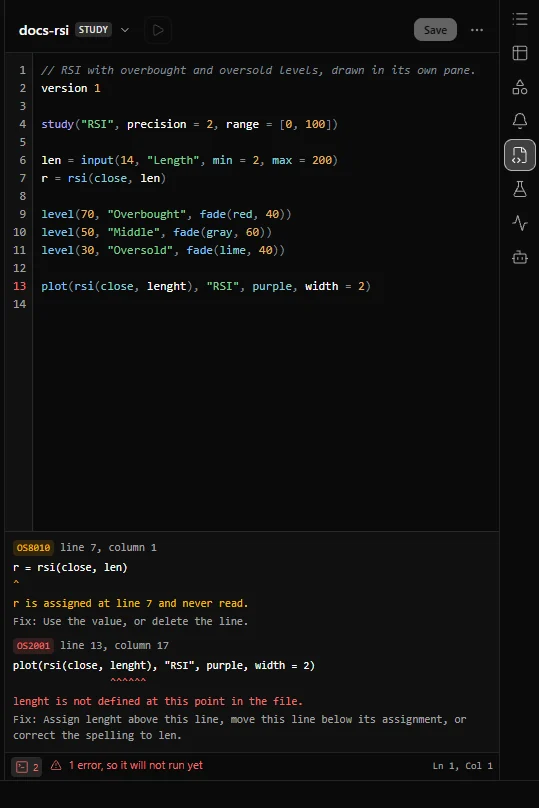
Save it. In the /trading editor, Ctrl+S saves and compiles in one step, and a script that does not compile is still saved. The status bar under the editor then says Ready, Ready with a count of warnings, or how many errors stop the script from running. The console button at the left of the status bar opens the console, which lists each diagnostic with its code, its line and column, the line itself with the problem marked, the message and the fix.
The editor does not complete names or show help on hover in this release, so keep the reference open beside it. See The editor.
Do I have to write version 1 at the top?
No, but always do. Without it the file is compiled with the newest language version the compiler has, which is the one thing that could change under you, and the compiler warns with OS8003. See Script structure.
Will my script keep working after an update?
A script that declares version 1 keeps compiling under the version 1 rules in every later release, because the compiler keeps every past version of the language. A release can still correct how a library function computes. When one does, the Release notes list it under the changes a script can observe: 0.5.0, for example, changed what text() and round() give in a few extreme cases that no ordinary price reaches, and 0.7.0 moved the final bits of some results of pow(), exp(), log() and the trigonometric functions when it made both engines agree on them to the last bit.
What is the difference between a study and a strategy?
A study only calculates and draws. A strategy is a study that can also place orders, declared with strategy(...) instead of study(...). The language, the file format and every drawing call are the same. In /trading, applying a study from the Scripts panel adds it to the chart, while applying a strategy runs a backtest over the chart's history and marks its trades. See Strategies overview.
The language
What types are there?
number, string, bool and color, each either a plain value or a series that has one value per bar, plus arrays such as array<number>. There is no separate integer type: a length, a bar count and a price are all number. none, the absent value, belongs to every type. See Types and values.
Why does "RSI " + r not work?
Nothing converts itself in OpenScript. A string and a number do not mix, so the compiler stops you with OS2003:
r = rsi(close, 14)
label = "RSI " + r
Convert the number yourself with text(), which also takes a number of decimals:
r = rsi(close, 14)
if crossUp(r, 50)
    signal("RSI " + text(r, 2))
plot(r, "RSI")
A silent conversion would have to pick a format for you, and a message or an alert that shows the wrong number of decimals, or none where you expected a price, is a bug you find late. See Types and values.
Why is if 1 an error?
A condition must be a bool or absent. There is no truthiness (treating a number or a string as true or false), so there is no rule about which values count as true to remember or to get wrong. if 1 is OS2011. A trading script that quietly treats a zero as false has a bug nobody finds until it costs money.
How do I write a block?
With indentation, using spaces. There are no braces, no end and no semicolons. Every line of one block carries exactly the same indentation, and four spaces is the convention. A tab character is OS1002 and a line out by one space is OS1003. In the /trading editor the Tab key inserts four spaces, and Shift+Tab takes them away, so pressing Tab never puts a tab character in the file. See Script structure.
Why can I not write a < b < c?
Because its two plausible readings disagree, and a script that places orders should not have to guess which one you meant. Write a < b and b < c. The chained form is OS1008. See Operators.
Where are &&, ||, ! and ^?
They do not exist. The words are and, or and not, and the power function is pow(). Typing one of the missing operators gives OS1001, and the message names the replacement.
Can a function call itself?
No. A function's state belongs to the place it is called from, so recursion would need an unbounded pile of state on every bar. Write a loop instead. A function that calls itself is OS2005. See User functions.
Why can I not declare a variable with a name that already exists outside the block?
Assigning to a name that already exists updates it, from any block. Declaring a second variable with the same name inside a block, for example with var, could only be a mistake, because two variables with one name is the shortest path to a value that is right in one place and stale in another. The compiler refuses it with OS2002:
count = 0
if close > open
    var count = 1
Drop the var to update the outer count, or pick a new name. See Variables and scope.
Values, absence and warmup
What is none?
The absent value: there is no value here. You write it bare, it belongs to every type, and every rule about how it behaves is fixed by the language rather than left to chance. See Absent values.
Is none the same as zero?
No, and this is the most important answer on this page. none + 1 is none, none * 0 is none, and an absent value reaching a plot draws a gap rather than a zero.
Why is none > 5 not false?
If it were false, then a > b and a <= b could both be false, and a script that takes one branch and assumes the other is its opposite would go the wrong way during warmup, on bars off the left edge of the screen where nobody looks. So an ordered comparison with an absent side is absent, and an if on an absent condition does not run its block (it runs the else block, if there is one): during warmup if r > 70 and if r <= 70 both skip theirs. Equality is the exception: x == none is always true or false.
How do I test for absence?
isNone(), or x == none. Equality always answers true or false, never absent, which is what makes the question askable. To replace an absent value with a fallback, use orElse().
Why does my line start part way along the chart?
Warmup: the first bars on which a calculation cannot have a value yet. A calculation that needs k bars is absent until k bars exist, so sma(close, 20) first has a value on bar 19. Every reference entry states the first bar its function has a value on. See Warmup.
How do I get a number during warmup?
orElse(x, fallback). Use it deliberately: a value you substitute on the first bars is data you invented. See Warmup.
What is close[1] on the first bar?
Absent. Nothing is clamped to the start of the data, because a clamped value looks like real data and is not. See Bars and history.
When do I need var?
When a value has to carry forward from one bar to the next. A plain assignment is worked out again from scratch on every bar. This study counts consecutive bars that closed higher than the bar before, and starts again from zero on any bar that did not:
version 1
study("Up-close streak")

var streak = 0

if close > close[1]
    streak = streak + 1
else
    streak = 0

plot(streak, "Consecutive higher closes", aqua, style = "histogram")
var streak = 0 runs once, on the first bar. On every later bar streak starts from the value the bar before left it with. On the first bar close[1] is absent, so the condition is absent and the else block sets the streak to zero. See Persistence.
What is the difference between var and [1]?
[1] is history: it reads the value a series had one bar ago. var is persistence: it keeps a value and carries it forward. They answer different questions and are often confused.
What does live var do, and should I use it?
It is a var that does not roll back when the newest bar runs again on an update, so it keeps counting within the bar. Use it only when counting those updates is the point, because a script that uses one reports different numbers on the chart than in a backtest of the same data, and the compiler warns with OS8011. See Realtime and confirmation.
Plotting and drawing
Why can I not put plot inside an if?
The chart needs the full set of plots before the first bar, to build the legend, the axis and the settings dialog. To hide a plot on some bars, plot none on them instead. A plot inside a block is OS3006. See Plots.
trend = ema(close, 50)
plot(close > trend ? trend : none, "Trend while price is above it", lime)
Why does every plot need a title?
The title is the plot's name in the legend, in the settings dialog and in the saved layout, so it is required and must be unique in the file. plot(x) without one is OS3012, and two plots with one title is OS3017.
How do I draw an arrow on a bar?
signal(text, shape = "arrowUp", at = "below"). One call covers every marker shape, and it may sit inside an if. See Labels and shapes.
How do I draw a line between two points and move it later?
With the draw namespace: draw.line(), draw.label(), draw.box(), draw.polyline() and the setters that move and restyle them. Objects are anchored to a time and a price, so they stay where you put them when more history loads. See Lines and boxes.
Is there a limit on how many objects I can draw?
The language fixes no number: the host sets the ceiling, and the engine's default, which the /trading chart keeps, is 10,000 objects held at once. A script that would create one more stops with OS5010 rather than having the oldest quietly deleted. Delete objects you no longer need.
How do I colour the candles themselves?
barColor(), on any bar, anywhere in the script, including inside an if. barColor(none) leaves the bar its own colour, which is how a condition switches the colouring off. See Bar colouring and backgrounds.
How do I put a value on its own scale, or shift it forward?
The scale and offset arguments of plot(). An offset moves where the plot is drawn, never what it contains. See Plots.
Data, sessions and other instruments
How do I read the daily close on an intraday chart?
req.timeframe("1D", close). By default it reads only days that have closed, so during today's session it gives the previous session's close, which is usually what you want for a pivot or a gap. See Higher timeframes.
prevClose = req.timeframe("1D", close)
plot(prevClose, "Previous session close", gray, style = "step")
Will that repaint?
Not in the default mode. mode = "confirmed" reads only higher timeframe bars that have closed and never repaints (redraws history differently after the fact). The other two modes must be written out in the source. "lookahead" raises warning OS8005 on its line. "developing" raises no warning, so treat it as a deliberate choice: it shows the coarser bar as it stands, and that value keeps changing until the bar closes. See Repainting.
Why is my higher timeframe read empty?
It is still warming up, the data has not arrived, or the host has not supplied what the read needs. Warmup is counted in the requested bars, so req.timeframe("1D", sma(close, 20)) is absent until twenty daily bars have closed, which on an intraday chart needs about a month of history. A daily, weekly or monthly read also needs the instrument's timezone from the host. req.isReady() and req.error() tell you whether the answer has arrived and, if the host refused, why.
Can I read another instrument?
Yes, with req.symbol(). This reads the NIFTY index on the chart's own interval, for example to compare a stock with the index:
nifty = req.symbol("NIFTY", chart.interval, close, exchange = "NSE_INDEX", mode = "developing")
plot(nifty, "NIFTY")
mode = "developing" pairs each chart bar with the index bar at the same time. The default, "confirmed", hands back only bars that have closed, which at the chart's own interval is the index's previous bar, so a comparison would mix two different bars. The value is absent until the host supplies the bars. Without exchange, the read uses the chart's own exchange. See Other instruments.
How do I work with the 09:15 to 15:30 session?
session.isIn() tells you whether a bar falls inside a window you state, such as session.isIn("0915-1530"), and bar.isFirst or not date.isSameDay(time, time[1]) finds the first bar of each day. Both read the bar's time in the chart's timezone. session.isFirstBar and session.isLastBar also need the instrument's trading hours.
All of these come from facts the host supplies, and a fact the host has not supplied makes the read absent rather than guessed. On /trading the chart, the Backtest panel and a deployed strategy all state the instrument's timezone and its regular trading session, taken from the market calendar, so session.isFirstBar marks the first bar of each NSE session in all three. A deployed strategy still refuses session.isLastBar. On the chart the session is read in the chart's timezone: set the chart to a zone other than the exchange's and the session is left out, so session.isFirstBar is absent. A new IST date, isNone(time[1]) or not date.isSameDay(time, time[1], "Asia/Kolkata"), finds the first bar of an NSE day without needing anything from the host, and naming the zone, as in session.isIn("0915-1530", "Asia/Kolkata"), keeps a window right whatever zone the chart is set to. See Sessions and time.
Alerts
How do I raise an alert?
Put alert(message, id = "...") inside the if that describes the condition. There is no separate function to declare a condition: the condition is the if you would have written anyway. In /trading, once the study is on a chart, the chart judges the condition when each bar closes, shows a notification when it fires, and the Alerts panel keeps a log of every firing. Alerts are checked by the chart that is open, so they fire only while /trading is open, and only for bars that close while it is: history loaded when the page opens is never alerted on.
A script alert reaches you on the page. To send a condition your script computes to Telegram or WhatsApp, or to give it an expiry, plot the condition as 1 or 0 and create a study alert on that plot from the chart's Create alert dialog, with Study plot as what to watch. See Alerts from scripts and Alerts on a script condition.
Why does my alert not fire on the bar where I can see it should?
Because that bar is still forming. Alerts, signals and orders wait until the bar closes, and if the condition is no longer true by then they never fire. That is what stops an alert from firing on a cross that is gone a minute later.
Why did adding the study not fire alerts for all the past bars?
By design. An alert is a statement about now, and hundreds of alerts for history would bury the one that matters.
Why does my alert need an id?
The id is the alert's stable name, which the host uses to keep track of it. Without one, the compiler names the alert after the line the call is on, which changes the moment you insert a line above it, and it warns with OS8008.
Strategies
How do I turn a study into a strategy?
Change study( to strategy( and add orders. strategy() takes every option study() takes, so the plotted numbers and the traded numbers are the same numbers, computed once. See Your first strategy.
version 1
strategy("EMA cross", overlay = true, capital = 500000, qtyType = "units")

// One lot, counted in units. chart.lotSize is absent, not 1, where the host
// states no lot size, such as a symbol whose contract is not downloaded.
lotUnits = max(orElse(chart.lotSize, 1), 1)

fast = ema(close, 9)
slow = ema(close, 21)

plot(fast, "Fast", aqua, width = 2)
plot(slow, "Slow", orange, width = 2)

if crossUp(fast, slow) and pos.isFlat
    buy(qty = lotUnits)

if crossDown(fast, slow) and pos.isLong
    close()
The size is one lot, stated in units, which is how NFO futures and MCX contracts are best sized in this release: the chart, the Backtest panel and a deployed strategy all state the lot size from the platform's instrument record, and the Strategies panel runs only a strategy that counts in units. See Position and sizing.
Why did my order fill at the next bar's open?
Because fillOn defaults to "nextOpen". A decision made from a bar's close cannot be filled at that same close in the real market, and a backtest whose default is optimistic is a backtest that misleads you. fillOn = "close" fills at the signal bar's close instead; use it knowing it flatters the result. See Costs and fills.
Can I hold a long and a short position at the same time?
Not in version 0.8.1. A strategy holds one net position in the chart's instrument, positive when long and negative when short, read as pos.size. Positions made of several legs, such as a straddle or a hedge, are planned through the leg and book functions. See Legs and books.
How do I size a position?
With qty on the order or the declaration, counted in the unit qtyType names: "units" or "lots". To risk a fixed amount per trade, work the size out yourself from the distance to your stop, round it down, and then actually exit at that stop:
version 1
strategy("Risk-sized entry", overlay = true, precision = 2,
         capital = 500000, qtyType = "units", qty = 1)

riskAmount = input(5000, "Rupees at risk per trade", min = 100)

fast = ema(close, 9)
slow = ema(close, 21)
crossedUp = crossUp(fast, slow)
crossedDown = crossDown(fast, slow)
swingLow = lowest(low, 10)

perUnit = close - swingLow
units = perUnit > 0 ? floor(riskAmount / perUnit) : none
canTrade = not isNone(units) and units > 0

var stopLevel = 0.0

if crossedUp and pos.isFlat and canTrade
    buy(qty = units)
    stopLevel = swingLow

if pos.isLong and (close < stopLevel or crossedDown)
    close()

plot(fast, "Fast", aqua)
plot(slow, "Slow", orange)
plot(pos.isLong ? stopLevel : none, "Stop", red, style = "step")
The stop is the lowest low of the last 10 bars, fixed at the entry. The two crossings are worked out at the top level, before the if lines, because a crossing call inside the right side of and or or would skip bars and the compiler would warn with OS8001. The exit is checked on each bar's close and fills at the next open, so a gap through the stop can lose more than the amount you set. A stop set with exit() is not used here because a backtest does not fill one in version 0.8.1.
The sizing helpers order.qtyForRisk(), order.qtyForCash(), order.qtyForEquityPercent() and order.roundToLot() are planned, and a backtest refuses a quantity counted in "cash" or "equityPercent" in this release. See Position and sizing.
Can a strategy read its own profit or equity?
Not yet. pos.size, pos.avgPrice, pos.isFlat, pos.isLong and pos.isShort work today. The money figures, such as pos.equity, pos.netProfit and pos.openProfit, are planned and are refused with OS2020. The backtest report shows the run's net profit, equity curve and drawdown once it finishes. See Reading a report.
Why was my order refused?
The OS7xxx code on the diagnostic says which rule it broke, and the message gives the numbers involved, such as the quantity or the price. See OS7xxx Orders.
Does a strategy trade with real money?
It depends on the mode OpenAlgo is in, not on the script. A strategy you deploy from the Strategies panel sends its orders through OpenAlgo's own order path: to the sandbox while OpenAlgo is in analyzer mode (sandbox trading), and to your trading account while it is in live mode. The mode is set elsewhere on the site. The Strategies panel shows it in its header, Analyzer or Live, and the start button reads Start in sandbox or Start live. Nothing in a script can choose the mode.
Backtest first, then run the strategy in sandbox trading (analyzer mode in OpenAlgo), then decide. See Sandbox and live.
Errors, warnings and limits
What does a code like OS2002 mean?
The first digit is the kind of problem: OS1xxx syntax, OS2xxx names and types, OS3xxx arguments, OS4xxx runtime, OS5xxx limits, OS6xxx data, OS7xxx orders, OS8xxx warnings, and OS9xxx import, the findings of the library's importer when it translates a script written in another chart scripting language (Importing a script). Every diagnostic carries a message and a fix. See Reading an error.
Do I have to fix the warnings?
Nothing stops if you do not. But every OS8xxx warning describes something that is valid and almost never what the author meant, so in practice: yes, read each one.
What does error OS2020 mean?
You used a name the language defines but this release does not implement yet. The reference marks such names with a Planned badge, and Release notes lists what is planned.
Is there a limit on loops?
2,000,000 iterations per bar by default, counted across every loop the bar runs, and raised in one line with limits(loops = ...) directly after the declaration. See Limits.
My script is slow. What is the usual cause?
A loop that walks the whole history on every bar. Keep a running value in a var instead, or use the library function that already does it, such as sum() or highest(). See Profiling and speed.
Where is the full list of errors?
The Errors section, one page per range, starting at Reading an error. The editor and those pages read the same catalogue, so they never disagree.
These pages and the libraries
Are the examples on these pages tested?
Yes. Every OpenScript example on these pages is checked with the real compiler, from openalgo-script 0.8.1, and every signature, default and warmup in the reference is read from that compiler rather than typed in. The /trading editor in current OpenAlgo releases runs version 0.5.0 of the same compiler, which has the same library names and signatures.
Can I use OpenScript outside OpenAlgo?
Yes. The JavaScript library (openalgo-script on npm) compiles and runs scripts, draws them on a chart, backtests strategies and imports a script written in another chart scripting language. The Python engine (openscript on PyPI) runs compiled programs on a server, with the same library entry for entry, arrays and print() among them. Both are Apache 2.0, and neither needs another package to run. See Two libraries.
Can I write my own engine?
Yes. The compiled program is a documented data format and the conformance suite says what any engine must reproduce. See Compiled program and Your own engine.
Can an AI assistant write OpenScript?
Yes, if you give it the reference. The whole documentation is published as one markdown file for exactly this. See Using AI assistants.
What works today, and what is still planned?
See Release notes, which summarises every release and the roadmap.
Related: Glossary, Troubleshooting, Reading an error, Example scripts.