
Operators
Arithmetic, comparison, equality, logical and conditional operators, the history and element operator, and assignment. What binds first and what each operator does with an absent value.
On this page
Operators combine values into expressions: close - open, r > 70, trending and volume > avgVolume. OpenScript has a short list of them, nine precedence levels in all, and every one has an exact rule for what it does when an operand is absent. This page teaches you to read any expression the way the compiler reads it: what binds first, what division gives you, what a comparison against an absent value returns, and when the right side of an and or an or is evaluated at all. The Operators reference lists every operator mark with its operand and result types.
A worked example
version 1
study("Down bars on heavy volume", precision = 2)

avgVolume = sma(volume, 20)
body = close - open
weighted = body + body[1] * 2  // body + (body[1] * 2)
heavyDown = not (close > open) and volume > avgVolume  // (not ...) and (...)

plot(weighted, "Weighted body", aqua)
plot(heavyDown ? 1 : isNone(heavyDown) ? none : 0, "Heavy down bar", orange, style = "histogram")
Read the last line with the absence rules in mind. avgVolume is absent for the first nineteen bars, so the comparison volume > avgVolume is absent there. On a down bar the left side of and is true and heavyDown is absent; on an up bar the left side is false, which decides the answer alone, and heavyDown is false. The nested ternary plots a gap where the answer is unknown instead of a confident zero.
Precedence
Precedence decides which operator takes its operands first when an expression has several, as multiplication does before addition in arithmetic. The table lists the tightest binding first. Every level groups left to right except where the notes say otherwise.
| Level | Operators | Notes |
|---|---|---|
| 1 | (expr), f(args), a[i], a.b | Grouping, call, history or element, member |
| 2 | unary -, unary +, not | Right to left |
| 3 | *, /, % | |
| 4 | +, - | |
| 5 | <, <=, >, >= | At most one per expression |
| 6 | ==, != | At most one per expression |
| 7 | and | Short-circuits |
| 8 | or | Short-circuits |
| 9 | cond ? a : b | Right to left |
a = 1
b = 2
c = 3
x = 4
y = 5

r1 = a + b * c  // a + (b * c), 7
r2 = -x % y  // (-x) % y, -4
r3 = close[1] * 2  // (close[1]) * 2
r4 = x > 0 ? 1 : x < 0 ? -1 : 0  // x > 0 ? 1 : (x < 0 ? -1 : 0), 1

plot(r1 + r2 + r3 + r4, "Sum")
Assignment is not in the table because it is not an operator. It is a statement, which is why if x = 5 does not compile: that is OS1006, with the fix naming ==.
The one precedence trap
not binds tighter than comparison, so not close > open means (not close) > open. not needs a bool, and close is a number, so the line is error OS2011 rather than the test you meant. Write the parentheses:
downBar = not close > opendownBar = not (close > open)
plot(downBar ? 1 : 0, "Down bar")The presence guard not isNone(x) and x > 5 needs no extra parentheses, because the call's own brackets already group isNone(x): it reads as (not isNone(x)) and (x > 5).
Arithmetic
+, -, *, / and % work on number. There is one numeric type, so there is one division, and / is always real division: 7 / 2 is 3.5. There is no integer division operator. When you want a whole number, say which way to round with a call the reader can see.
| Expression | Value | Why |
|---|---|---|
7 / 2 | 3.5 | Division is always real |
-7 / 2 | -3.5 | The same |
floor(7 / 2) | 3 | floor() rounds toward negative infinity |
floor(-7 / 2) | -4 | So a negative value goes down |
trunc(-7 / 2) | -3 | trunc() rounds toward zero |
round(-7 / 2) | -4 | round() rounds to nearest, halves away from zero |
7 % 2 | 1 | The remainder after division |
-7 % 3 | -1 | % takes the sign of the left operand |
7 % -3 | 1 | The same |
mod(-7, 3) | 2 | mod() takes the sign of the right operand |
mod(7, -3) | -2 | The same |
7 / 0, 0 / 0, 7 % 0 | none | Division by zero has no answer |
Two remainders exist because both are wanted. % suits a "distance past a multiple" calculation; mod suits an index into a repeating cycle. The two agree whenever both operands are positive, which covers wrapping a bar count or a position in a session.
There is no power operator: pow(x, y) is the power function. See pow(). Since version 0.7.0 it is computed with a portable algorithm and one final rounding, as exp(), log() and the math trigonometric functions are, so the JavaScript and Python engines give the same result to the last bit. A value stored from an earlier version may differ in its final bits.
Every arithmetic operator propagates absence: if either operand is absent, so is the result, including none * 0. Arithmetic with no finite answer gives none rather than infinity or an error. Absent values covers both rules.
version 1
study("Stop a few ticks under the low", overlay = true, precision = 2)

steps = input(3, "Distance, in ticks", min = 1, max = 100)

// chart.tickSize is absent when the application running the script does not
// state one. The product is then absent, and so is the level, so nothing is
// drawn rather than a price the exchange would not accept.
offset = steps * chart.tickSize
stopLevel = roundToTick(lowest(low, 20) - offset)

plot(stopLevel, "Stop level", red, width = 2, style = "step")
Joining strings
+ also joins two strings, and does nothing else. "a" + 5 is OS2003; convert the number with text() first.
t = table("Last close", 1, 1)
message = "Close " + text(close, 2) + " on " + chart.symbol

if bar.isLast
    cell(t, 0, 0, message)
An absent operand makes the whole string absent, so a message with one absent part is no message at all: if chart.symbol were absent, the cell above would be blank. text(x) with one argument writes an absent value as the string "none", which is the way to show an absence in the output rather than lose the whole string.
Comparison
<, <=, > and >= compare two numbers or two strings. Strings compare by Unicode code point, which is the same in every locale; it is not a dictionary order.
A comparison cannot be chained. 30 < r < 70 is error OS1008. Write the middle value twice:
r = rsi(close, 14)
inBand = 30 < r < 70
r = rsi(close, 14)
inBand = 30 < r and r < 70
plot(inBand ? 1 : 0, "RSI between 30 and 70")Chaining is refused rather than given the mathematical meaning because a reader could take it two ways, and a form with two plausible meanings has no place in a language that places orders.
Ordered comparison propagates absence. If either side is absent, the result is absent, not false. That keeps not (a > b) equal to a <= b for every input: during warmup both are absent and both branches are skipped. A comparison written against none itself is therefore absent on every bar, and is warning OS8012; test with isNone() instead.
Equality
== and != always return true or false, never absent. That is the deliberate exception to propagation, because a question that could not be answered would be no use.
| Case | Result |
|---|---|
none == none | true |
none == 5 | false |
5 != none | true |
| Two colours | Equal when all four channels match |
| Two arrays | Equal when they are the same array, not when their contents match |
| Two values of different types | OS2003, except against none, which is always allowed |
arrayEqual() compares the contents of two arrays. == compares identity, because an array is a reference: b = a gives two names for one array.
Because equality is total, x != x[1] is true on bar 0, where x[1] is absent, and a marker for a change of state would fire on the first bar of every chart. The same trap waits at the end of warmup, when a value that was absent becomes present. Keep the state absent until it means something, and require the previous value to be present:
version 1
study("Direction flips", overlay = true, precision = 2)

fast = ema(close, 9)
slow = ema(close, 21)

// Absent until both averages exist. Without the guard the ternary would read
// -1 through the warmup, and the first real reading could look like a flip.
dir = isNone(slow) ? none : (fast > slow ? 1 : -1)

if not isNone(dir[1]) and dir != dir[1]
    signal(dir == 1 ? "TREND UP" : "TREND DOWN")

plot(fast, "Fast", aqua, width = 2)
plot(slow, "Slow", orange, width = 2)
Logical operators
The logical operators are the words and, or and not. They take bool operands and use three-valued logic, where none means "unknown".
a | b | a and b | a or b |
|---|---|---|---|
true | true | true | true |
true | false | false | true |
true | none | none | true |
false | any | false | b |
none | true | none | true |
none | false | false | none |
none | none | none | none |
not none is none, and not not x is legal and means x.
An unknown operand is absorbed exactly when the other one decides the answer by itself: a false under and, a true under or.
Both operators are commutative. a and b equals b and a, and a or b equals b or a, for every combination of true, false and none, so the order you write the operands in never changes the answer. The usual rules for negating a combination hold too, absent operands included: not (a and b) is not a or not b. What decides whether a guard works is the operator, not the side a test sits on: isNone(x) and x > 5 is never true, however it is written.
Short-circuit evaluation
An operand is evaluated only if it can change the result. Skipping the rest of an expression once its answer is settled is called short-circuiting.
| Expression | Left side is | Right side evaluated | Result |
|---|---|---|---|
a and b | false | No | false |
a and b | true | Yes | b |
a and b | none | Yes | false when b is false, otherwise none |
a or b | true | No | true |
a or b | false | Yes | b |
a or b | none | Yes | true when b is true, otherwise none |
An absent left side settles nothing on its own, so the right side is evaluated in both cases. Only a left side that decides alone skips the right side.
Order does not change what an expression means, but it does change what runs. Put the cheaper or more often decisive test on the left, so its answer saves the work on the right. This line saves the right side on bar 0, because bar.isFirst is true there:
newDay = bar.isFirst or not date.isSameDay(time, time[1])
background(newDay ? fade(silver, 85) : none)
Keep stateful calls out of the right side. A call that keeps state between bars, such as rsi(), ema() or a user function with a var in it, does not advance on a bar where it is skipped, and its value is absent there. The compiler reports warning OS8001:
useFilter = input(true, "Use the filter")
if useFilter and rsi(close, 14) > 70
    signal("HIGH")
Compute it at the top level, where it runs on every bar, and use the result in the guard:
version 1
study("Filtered overbought", precision = 2)

useFilter = input(true, "Use the filter")
len = input(14, "RSI length", min = 2, max = 200)

r = rsi(close, len)

if useFilter and r > 70
    signal("HIGH")

plot(r, "RSI", purple, width = 2)
level(70, "Overbought", fade(red, 50))&&, || and ! do not exist; the operators are the words.
The ternary
cond ? a : b (the ternary, or conditional operator) chooses a value. The condition must be a bool or absent, and an absent condition takes the false arm. Both arms must have the same type, or one arm may be none, and only the taken arm is evaluated.
r = rsi(close, 14)
tint = close > open ? lime : red

// A chain nests to the right, so it reads as a list of cases with the last one
// the default. The first case keeps the warmup bars absent.
zone = isNone(r) ? none : r > 70 ? 1 : r < 30 ? -1 : 0

plot(r, "RSI", tint)
plot(zone, "Zone: 1 above 70, -1 below 30")
Arms of different types are OS2012. There is no expression form of switch: the ternary chooses a value, and switch chooses a block.
Because only the taken arm runs, the ternary is a safe guard for a division: down > 0 ? up / down : none. For the same reason a stateful call inside an arm only advances on the bars that take that arm, and is warning OS8001. Take the call at the top level and put its result in the arm:
version 1
study("Up-volume share", precision = 2)

flow = sum(close > open ? volume : 0, 20)
traded = sum(volume, 20)
share = traded > 0 ? flow / traded : none

plot(share, "Share of volume on up bars", aqua)
The ternary is also how a plot is hidden on some bars, since plot() must stay at the top level: plot(trending ? ema20 : none, "EMA 20", aqua).
History and element access
a[i] means one of two things, chosen at compile time from the type of a:
a is | a[i] means | Example |
|---|---|---|
| A series | The value i bars back | close[1], the previous close |
| An array | Element i, counting from 0 | levels[0], the first element |
version 1
study("History and elements", overlay = true, precision = 2)

var recent: array<number> = []
push(recent, close)
if size(recent) > 20
    shift(recent)

oldest = recent[0]  // element: the first item in the array
back19 = close[19]  // history: the close 19 bars ago

plot(oldest, "Oldest close in the array", silver)
plot(back19, "Close 19 bars back", orange)
Once the array holds its twenty closes, the two lines are one line. Before that, on the first nineteen bars, recent[0] is the very first close while close[19] is absent: element access reads what the array holds, and history reads what the data holds.
| Situation | Result |
|---|---|
x[n] where n is greater than bar.index | none: not clamped, not zero, not an error |
x[n] where n is absent | none |
x[n] where n is negative or not whole | OS4001, which stops the script at that bar |
x[n] deeper than the history the engine keeps | OS4002, naming the limits(history = ...) that raises it |
arr[i] outside 0 to size - 1 | OS4004, an error |
Reading past the start of history is absence, because that value never existed. Reading past the end of an array is an error, because the script asked for something it never created.
Where a reader could doubt which meaning a line uses, write the explicit form: history() always reads a series some bars back, and element() always reads an element of an array. Bars and history covers the history operator in full.
Member access
a.b reads a member of a namespace, such as bar.isConfirmed, chart.symbol or session.isFirstBar, or calls one, such as date.dayOfWeek(). A name after the dot that the namespace does not have is OS2009.
Assignment
Assignment is a statement, never an expression.
| Form | Means |
|---|---|
name = expression | Declare the name in this scope, or update it if it already exists in an enclosing one |
name += expression | name = name + expression |
name -= expression | name = name - expression |
name *= expression | name = name * expression |
name /= expression | name = name / expression |
name %= expression | name = name % expression |
The compound forms obey every rule of the long form, including absence: x += none leaves x absent. A name's type is fixed by its first assignment, and a different type later is OS2003.
version 1
study("Cumulative volume", precision = 0)

var total = 0.0

// Without the guard, one bar with no volume would make total absent for ever.
if not isNone(volume)
    total += volume

plot(total, "Cumulative volume", silver, style = "area")
Operators that do not exist
| You might write | Write instead | Error |
|---|---|---|
!cond | not cond | OS1001 |
a && b, a || b | a and b, a or b | OS1001 |
a ^ b, a ** b | pow(a, b) | OS1001 |
i++ | i += 1 | OS1001 |
i-- | i -= 1 | OS1022 |
a & b, a | b, ~a | Nothing: there are no bitwise operators | OS1001 |
a < b < c | a < b and b < c | OS1008 |
if x = 5 | if x == 5 | OS1006 |
a; b | Two lines | OS1007 |
{ ... } | Indentation | OS1001 |
up = close > open
down = !up
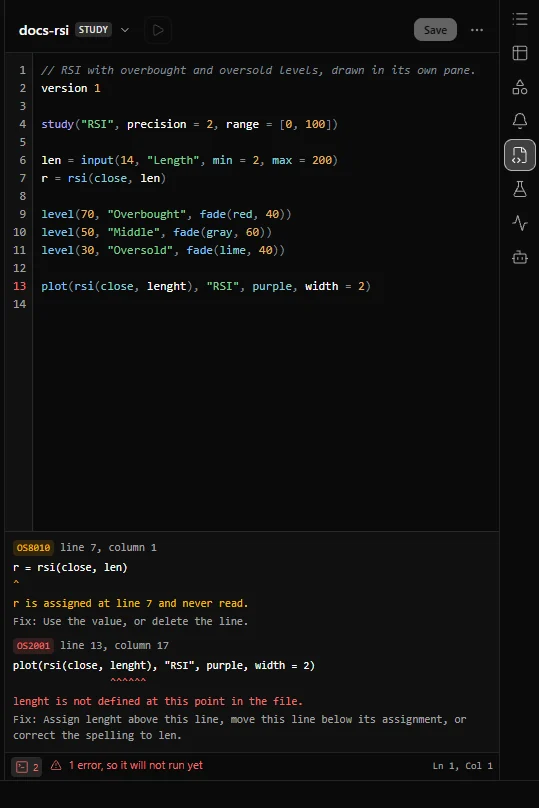
The console under the editor shows each of these with its line, its code and the fix:
Absent operands at a glance
| Operator | With an absent operand |
|---|---|
unary -, unary +, not | Absent |
*, /, %, +, - | Absent if either operand is |
+ on strings | Absent if either operand is |
<, <=, >, >= | Absent if either operand is |
==, != | Never absent: none == none is true |
and, or | Three-valued, see the table above |
? : condition | An absent condition takes the false arm |
a[n] with n absent | Absent |
Related. Types and values, Absent values, Control flow, Bars and history, Operators reference, Math