
Editor integration
The six headless editor functions in openalgo-script/editor, highlight, complete, diagnose, hover, signature and format, and the drop-in editor adapter that wires them into a text component without drawing anything itself.
On this page
This page is for a platform putting an OpenScript editor in front of its traders. The language ships the intelligence an editor needs as six pure functions, text in and data out, with no user interface and no DOM: highlight, complete, diagnose, hover, signature and format. The text component, the panel around it, the theme, saving and the apply button stay yours. This page covers each function, what it costs to call, and the drop-in adapter for teams that would rather not wire the six by hand.
None of the six is written separately from the language. Highlighting is the real lexer. Diagnostics are the compiler's own, with their messages and fixes taken from the error catalogue. Completions and hover text come from the standard library manifest and the specification's own tables, and the defaults a signature shows are the defaults the compiler applies. A word added to the language is coloured, completed and explained on the day it is added, with no change to your editor.
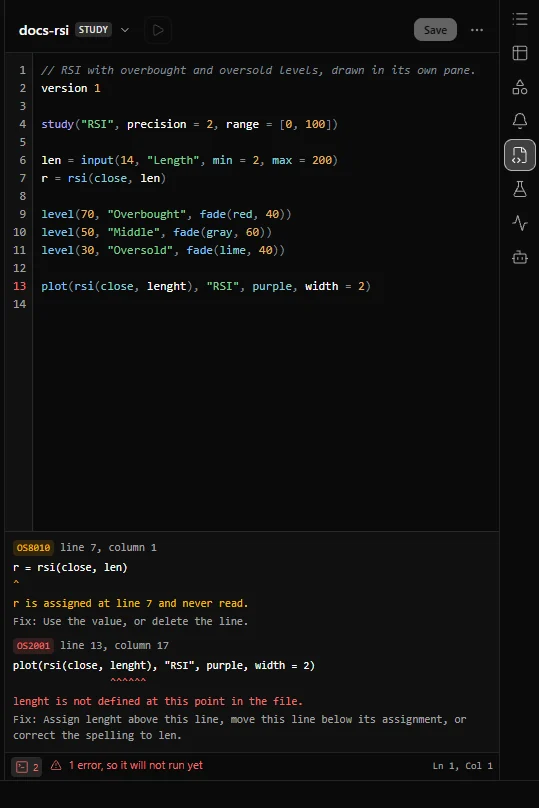
The Scripts panel console, below, lists the same diagnostics diagnose returns for a file: each one's code, line and column, message and fix, warnings (here OS8010, a value assigned and never read) as well as errors.
A first editor
This module turns a script into highlighted HTML, lists its problems, and applies a completion. It runs in a browser or in Node.js:
import { highlight, diagnose, complete } from "openalgo-script/editor";
import { normaliseSource } from "openalgo-script";
const escape = (text) => text.replace(/&/g, "&").replace(/</g, "<").replace(/>/g, ">");
/** The script as HTML: one span per piece, one class per kind. */
export function toHtml(source) {
return highlight(source)
.map((p) => (p.kind === "whitespace" ? escape(p.text) : `<span class="os-${p.kind}">${escape(p.text)}</span>`))
.join("");
}
/** The rows of a problems panel, straight from the compiler. */
export function problems(source) {
return diagnose(source).map((d) => ({
line: d.span.line,
column: d.span.column,
code: d.code,
severity: d.severity,
message: d.message,
fix: d.fix,
}));
}
/** Accept a completion row: replace the span it names, never just insert at the cursor. */
export function accept(source, row) {
const { offset, length } = row.replace;
return source.slice(0, offset) + row.insert + source.slice(offset + length);
}
// Offsets index the normalised text, so normalise the buffer once on the way in.
const buffer = normaliseSource('version 1\r\nstudy("EMA", overlay = true)\r\nplot(em');
const rows = complete(buffer, buffer.length); // [{ label: "ema", insert: "ema", kind: "function", ... }]
const next = accept(buffer, rows[0]); // ends with "plot(ema"
console.log(problems(next)); // OS3012, OS1012 and OS2014: the unfinished call, each with its fixStyle the classes once. The set of kinds is closed, so the theme never needs a rule for a word the language adds later.
highlight
highlight(source) -> [{ kind, span, text }, ...]
highlightLines(source) -> [{ line, pieces }, ...]
Every piece of the file, in order, covering every character exactly once. No piece is empty, none overlaps its neighbour, and joining their texts gives you the file back. That is the property to rely on: a highlighter that drops one character draws everything after it on that line one column to the left, and the caret stops sitting where the text is.
highlightLines gives the same pieces grouped by line, one entry per line including the blank ones, with no line ending inside any piece. Use it when you render a line at a time; it saves you deciding which line a run of whitespace across a line ending belongs to.
| Kind | Is |
|---|---|
keyword | A reserved word of the language |
builtin | A name in the standard library, such as ema, close or aqua |
name | Any other name, including the ones the script declares |
number | A number literal |
string | A string literal |
color | A hexadecimal colour literal such as #ff8800 |
comment | A comment |
operator | A mark that computes something, such as + or >= |
punctuation | A mark that groups or separates, such as ( or , |
whitespace | Spaces and the layout between tokens |
unknown | Source the lexer took no token from |
A named colour such as aqua is a library value, so it arrives as builtin. To paint it in its own colour, ask hover for its channels. unknown does not mean wrong: diagnose is what says whether something is a mistake.
Comments come back from here. The parser has no use for a comment, so the lexer emits no token for one, and a host usually ends up recovering them from the gaps. Ask highlight for pieces of kind comment instead; scanning for // yourself goes wrong on a // inside a string.
Offsets index the normalised text. A byte order mark is dropped and CRLF becomes LF before anything reads a file. Normalise your buffer once with normaliseSource from the core, or draw from each piece's own text and never index your buffer at all.
diagnose
diagnose(source) -> [Diagnostic, ...]Every diagnostic a compile of that text produces, in the order a reader walks the file. It is the same Diagnostic record the compiler produces anywhere: code, severity, message, fix, span and the values that filled the message. JavaScript library lists every field.
It is the whole compiler, not a subset. Some codes are raised only when the program is emitted, so an editor that stopped after the type checker would show a clean file and then have the apply button refused with a code the panel never mentioned.
A file that does not parse still answers usefully, because that is the normal state of a file someone is typing into. A lexical mistake costs its own character, a statement that will not parse costs its own line, and the lines around it are still checked, so a trader fixing three mistakes sees all three at once.
What it costs. A finished ninety line study takes well under a millisecond, about a third to half of one, and the same file with a bracket left open halfway down, the state a file is in the moment someone types one, takes about a millisecond. The project's build holds both to a budget (1.5 and 4 milliseconds), so a change that made the editor several times slower fails there before it reaches you. Call it on a debounce of a few tens of milliseconds and it will not show in a frame.
complete
complete(source, offset) -> [{ label, insert, kind, detail, summary, planned, refusal, replace }, ...]What may be written at that position: the library's functions and values, the names the file has declared and still has in scope, the named arguments of the call being written, and the members of a namespace after a dot.
| Field | Holds |
|---|---|
label | What the row shows |
insert | What accepting it writes |
kind | function, value, namespace, member, variable or argument |
detail | The signature, such as ema(src: series number, len: number) -> series number |
summary | The name's one-line description |
planned | True for a name the library declares and this release does not implement |
refusal | For a planned name, the compiler's own sentence refusing it |
replace | The span the row replaces: the word already typed, or an empty span at the cursor |
Four rules, each of which is a bug if you ignore it:
- Replace
replace, do not insert at the cursor. Otherwise a trader who typesemand acceptsemagetsemema. - The list is already filtered, exactly. Names are case sensitive. Run a fuzzy matcher over the list and you will offer
EMA, which does not compile. - A name is offered from the end of the statement that declares it, because that is where the compiler lets you use it, and a name declared inside a block is offered only inside that block.
- Planned names come last and are marked. Grey the row and show
refusal, or drop it. Writing one is OS2020.
Reserved words are not offered. The core exports them as RESERVED_WORDS if your editor wants to add them where it judges them useful.
hover
hover(source, offset) -> { kind, span, name, signatures, summary, warmup, type, declaredAt, colour, planned, refusal } | undefinedWhat the word under the pointer is. kind is library, declared or keyword, and nothing comes back for a space, an operator, a number or a string. Take this file:
version 1
study("RSI", overlay = false)
r = rsi(close, 14)
plot(r, "RSI", purple)
With the pointer on rsi in the third line, hover answers:
{
  "kind": "library",
  "span": { "offset": 44, "length": 3, "line": 3, "column": 5 },
  "name": "rsi",
  "signatures": ["rsi(src: series number, len?: number = 14) -> series number"],
  "summary": "0 to 100 reading of how one-sided the last `len` changes were",
  "warmup": "bar `len`",
  "type": "series number",
  "planned": false
}
span is the word to underline. Fields with nothing to say, such as declaredAt for a library name, are left out.
Version 0.6.0 corrected the one-line description hover gives for six drawing calls. In 0.5.0 it was cut short, so draw.setFrom() was described as "nothing" and draw.delete() as "box"; an editor on 0.6.0 or newer shows the full sentences.
| The word is | You get |
|---|---|
| A library name | Every signature, its one-line description, and warmup: the first bar it can have a value on |
| A name the script declared | The type the checker worked out, and declaredAt, the span where it was declared, for a jump to definition |
| A named colour | colour: its red, green, blue and alpha, for a swatch |
| A reserved word | kind: "keyword" with its name and span, and no description |
Three things a hover cannot give you, because the text does not exist in a form it can read:
| Missing | Why, and what to do |
|---|---|
| An explanation of a reserved word | Each word is explained in prose where the language uses it, not in a table. Link the word to the keywords reference |
| A description per signature | A name with several signatures lists them all with one description, the first one's |
| A description per parameter | signature gives each parameter's name, type, default and accepted values, and no sentence |
signature
signature(source, offset) -> { name, of, signature, parameters, active, summary, planned, refusal, span } | undefinedThe call being written, and which parameter the cursor is in. It works on a call that is still being typed, which is the only time it is asked: the call is found from the brackets, not from a syntax tree that does not exist yet.
| Field | Holds |
|---|---|
name, signature, summary | The call, its full signature and its description |
of | library, or declared for a function the file defines itself |
parameters | Each parameter's name, type, required, defaultText and accepted values |
active | The index of the parameter the cursor is in, or -1 past the last one, which is a call with too many arguments |
span | Where the call's name is |
The default shown is the default the compiler applies, for an ordinary library call and for the output declarations, plot(), plotCandles(), fill(), level(), signal(), alert(), input(), table(), barColor() and background(), whose optional arguments become fields of the compiled program. Inside plot(close, it reports color defaulting to none, width to 1.5 and style to "line", the values the compiler writes. A written label decides the active parameter, because a named argument may sit anywhere after the positional ones. While a call is unfinished its overload is chosen by the number of arguments alone; once the arguments are written, diagnose reports any call that resolves to something other than what was meant.
In 0.8.1 signature returns nothing inside study( or strategy(: the two declaration lines have no entry for it to read. Link those to the declarations reference instead.
format
format(source) -> source, laid outThe language's canonical layout: indentation, spacing around operators and after commas, where a comment sits, blank lines.
before:  basis=sma(close,20)
after:   basis = sma(close, 20)
Formatting never changes what a script computes, and that is checked rather than promised. The project lays out every example and every test script again, compiles both texts and requires identical compiled programs. On top of that, every call lexes its own output and compares it with the tokens that went in; if anything moved, your source comes back untouched. A formatting rule that is wrong therefore does nothing, which is the only acceptable way for it to fail on a strategy holding a position.
A source that does not parse comes back unchanged, byte for byte, rather than laid out as far as it could be. Line breaks inside a statement stay where the writer put them.
What stays yours
The text component and its caret. The panel, the gutter, the squiggles and the theme. Debouncing, and when to format. Saving, revisions and the apply button. Which diagnostics to show, and where. All of that is design, and it is yours for the same reason your chart is: a language package with opinions about it is a package nobody can embed.
The drop-in editor adapter
For a team using the popular open-source editor component this adapter targets, openalgo-script/adapters/codemirror wires the six functions into it in a few lines. The component is an optional peer dependency and nothing in the adapter imports it, so installing openalgo-script pulls in no editor at all.
| Export | Is |
|---|---|
openscriptStream | A line tokenizer for the component's stream language support: highlighting, a line at a time |
openscriptCompletion | A completion source |
openscriptLint | A linter source: the compiler's diagnostics, with the fix under each message and the code as its source |
openscriptHoverTooltip(render) | A hover tooltip source. You pass the renderer |
openscriptSignatureTooltip(render) | A signature tooltip that follows the cursor inside a call's brackets. You pass the renderer |
formatDocument | An editor command that formats the whole document and keeps the caret where it was |
hoverLines, signatureLines | What each tooltip says, as an ordered list of lines, for your renderer |
diagnosticsFor(text) | The linter's answer for a text, without a view |
documentOf(text), normalisedOffset(document, offset) | The offset translation the adapter does, for a host that wires some pieces itself: the normalised text, and how an offset maps between it and the editor's own document |
HIGHLIGHT_TOKENS, COMPLETION_TYPES | The mapping from the language's kinds to the component's style and completion type names |
import {
  openscriptStream, openscriptCompletion, openscriptLint,
  openscriptHoverTooltip, openscriptSignatureTooltip, formatDocument,
  hoverLines, signatureLines,
} from "openalgo-script/adapters/codemirror";

// StreamLanguage, autocompletion, linter, hoverTooltip, showTooltip and keymap are
// the editor component's own exports, imported from its own packages.

// The markup is yours: the adapter draws nothing.
const panel = (lines) => {
  const dom = document.createElement("div");
  dom.className = "os-tooltip";
  for (const line of lines) dom.append(Object.assign(document.createElement("div"), { textContent: line }));
  return { dom };
};

export const openscript = [
  StreamLanguage.define(openscriptStream),
  autocompletion({ override: [openscriptCompletion] }),
  linter(openscriptLint),
  hoverTooltip(openscriptHoverTooltip((held) => panel(hoverLines(held)))),
  showTooltip.compute(["doc", "selection"], openscriptSignatureTooltip((held) => panel(signatureLines(held)))),
  keymap.of([{ key: "Shift-Alt-f", run: formatDocument }]),
];
Nothing in the package draws. Both tooltips take the markup as a required parameter with no default, which is what lets every file in the package load in a worker and on a server. What a tooltip says is still the compiler's: hoverLines and signatureLines give you the lines, and only the element around them is yours.
Offsets are translated for you. Every span the language produces indexes the normalised text, while the component holds the document exactly as it was typed, CRLF line endings included. The adapter maps between the two, so a squiggle below the first line of a file with CRLF line endings lands under the text it is about.
Highlighting a line at a time loses nothing. The component asks for one line at a time and highlight reads a whole file, but nothing in the language crosses a line ending, and the project measured both over thousands of lines of scripts and malformed input without one piece differing.
What the adapter narrows, compared with calling the six functions yourself:
| Narrowing | Instead |
|---|---|
| The component looks style names up at run time, so no type check catches a name its theme does not know | Spread HIGHLIGHT_TOKENS with your theme's own names, or call highlight and draw your own decorations |
| The completion list is filtered exactly and the component is told not to filter it again | Call complete and filter the rows your own way before handing them over |
| The signature tooltip appears whenever the cursor is inside a call, with no key to open or dismiss it | Call signature and show it on the gesture your product uses |
| Formatting replaces the whole document, and a document with CRLF line endings comes back with LF | Call format and apply the result the way your product wants |
A platform with its own editor writes its own adapter in the same shape and keeps everything else: the six functions are the supported path, not a fallback.
Related. JavaScript library, Two libraries, The editor, Reading an error, Style guide, Chart adapter