
Sandbox and live
Deploying a strategy from the Strategies panel in /trading, running it in sandbox trading (analyzer mode in OpenAlgo) first and then live, what the strategy runner needs from a script, and how to pause and stop one safely.
On this page
A backtest says what a strategy would have done. A deployment runs it: a process on the OpenAlgo server executes the same compiled script on each bar as it closes and sends real orders through the platform's own order path. This page covers deploying a strategy from the Strategies panel in /trading, running it in sandbox trading (analyzer mode in OpenAlgo) first, what changes when it runs live, what the strategy runner needs from a script, and how to pause, stop and restart one without losing track of a position.
A strategy ready to deploy
The strategy runner runs a subset of what the backtest runs. This file stays inside it: its quantity is in units, and its stop is a rule the script tests on each close rather than a bracket.
version 1

// Written for the strategy runner: units, and a stop written as a rule
// rather than exit(), which the runner does not send yet. The costs are for
// the backtest; a deployment pays whatever the market charges.
strategy("EMA cross, deployable", overlay = true, precision = 2,
         capital = 500000, qty = input(1, "Quantity, units", min = 1),
         product = "intraday",
         fillOn = "nextOpen", slippage = 1,
         commissionType = "percent", commission = 0.023)

fastLen = input(9,  "Fast length", min = 1, max = 500)
slowLen = input(21, "Slow length", min = 2, max = 500)
maxLoss = input(1.0, "Close a long this far below entry, percent", min = 0.1, max = 20)

fast = ema(close, fastLen)
slow = ema(close, slowLen)
goLong = crossUp(fast, slow)
goFlat = crossDown(fast, slow)

// The stop, from the strategy's own entry price. pos.avgPrice is absent while
// flat, so the test below is only ever true while a position is open.
stopLevel = pos.avgPrice * (1 - maxLoss / 100)
tooFar    = close <= stopLevel

if goLong and pos.isFlat
    buy()

if pos.isLong and (goFlat or tooFar)
    close()

plot(fast, "Fast", aqua, width = 2)
plot(slow, "Slow", orange, width = 2)
plot(pos.isFlat ? none : pos.avgPrice, "Entry", silver, style = "step")
plot(stopLevel, "Stop", red, style = "step")
Backtest it first, from the Backtest panel, until you believe the report. Then deploy it in sandbox trading and let it run for long enough to compare its trades with the backtest's.
Where a strategy runs
| Where | Bars | Orders go to | Money |
|---|---|---|---|
| Backtest panel | History, all of it closed | A fill model over the bars, in your browser | None |
| A deployment, in analyzer mode | Each bar as it closes | OpenAlgo's sandbox | None |
| A deployment, in live mode | Each bar as it closes | Your broker, through OpenAlgo | Yours |
The script and its inputs are the same in all three. What differs is where the orders go, and nothing in a script decides that. A deployment sends its orders through OpenAlgo's own order path, the same path every other surface of the platform uses, and that path reads the platform's analyzer setting before anything else:
- While OpenAlgo is in analyzer mode, a deployment's orders go to the sandbox. The sandbox checks each order against its own funds and margin, fills it against the latest quote for the instrument, and keeps its own orders, trades and positions. No money moves.
- While OpenAlgo is in live mode, the same orders go to your broker.
There is no call, no declaration option, no input and no field in the deployment form that chooses the destination, and a script cannot ask which one it is running against. That is deliberate. A strategy that behaved differently once it was live would be a strategy nobody had tested, and the sandbox run would stop being evidence about the live one.
A deployment that is holding a position when the setting changes does not follow it. Its next order goes to the new destination, the run sees that the destination changed under an open position, stops, and writes in its log that the position was opened at the earlier destination and must be checked and closed by a person. Change the setting while your deployments are flat.
Deploying from the Strategies panel
Open Strategies from the toolbar on the right-hand edge of /trading. It sits after Backtest, in the order the work happens.
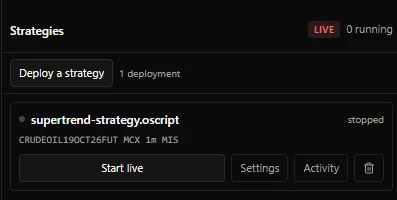
The header shows the platform's current destination as a badge, Analyzer or Live, and how many deployments are running. Hover the badge and it says where a running strategy's orders go.
- Press Deploy a strategy. It is available once you have saved at least one strategy; a study plots and places no orders, so only a strategy is offered.
- Choose the Strategy, then the instrument. The form starts on the chart's own instrument and interval. Type in the instrument box to search the platform's instrument list for the chosen exchange, then pick the Exchange, the Interval your broker serves, and the Product.
- Set the inputs. Every
input()the script declares is a field, as in the Backtest panel. A field left empty runs on the script's own default. - Press Deploy. The deployment appears as a row, stopped.
- Press Start in sandbox. In live mode the same button reads Start live. The row turns to running, with how long it has been running and the server process it runs in.
| Product | Offered on | Means |
|---|---|---|
MIS | Every exchange | Intraday |
CNC | Cash exchanges, such as NSE and BSE | Delivery |
NRML | Derivative exchanges, such as NFO, BFO and MCX | Carried on margin |
The product chosen here is the product every order is sent as, whatever word the script's product option uses, and the form starts on MIS. A script written to carry a position overnight, with product = "overnight", therefore runs as intraday unless you pick CNC or NRML yourself. The form offers only the products the chosen exchange takes, so you cannot pick one its venue does not have.
A deployment is a strategy on one instrument at one interval. The same strategy can be deployed on as many instruments and intervals as you like, and each deployment runs, holds, keeps its books and stops on its own. Changing the instrument or the interval in a deployment's settings makes a second deployment rather than moving the first, so a strategy you are already running is left where it is. Deploying the same strategy twice on the same instrument and interval is refused, because that is one strategy running twice on one instrument.
Each row carries:
| Control | What it does |
|---|---|
| Start in sandbox or Start live | Starts the deployment. Needs an instrument to be set |
| Pause | Ends the run and leaves its position exactly where it is |
| Stop | Closes what the run is holding, then ends it. Asks first |
| Settings | Opens the deployment's instrument, product and inputs. A running strategy reads its inputs when it starts, so pause it and start it again to apply a change |
| Activity | Opens the deployment's Orders, Trades and Positions. Reading the books covers them |
| Remove (the bin icon) | Removes the deployment and its schedule, after asking. Available only while it is not running. The strategy stays in the editor, and anything it traded stays in your books |
With more than six deployments, a search box finds one by strategy or instrument. The list refreshes itself whenever an order moves anywhere on the platform, and every fifteen seconds in case a run ended on its own.
What the runner needs from a script
The server does not compile anything. It runs the compiled program the editor stores beside the script each time a save compiles with no errors; a save with errors removes the stored program, so the program always matches the script as saved. Pressing Start on a script with no compiled program is refused in the panel, with a message telling you to open it in the chart and save it once the console shows no errors.
The server runs that program on openscript, the Python library of the language, rather than on the engine in your browser. In current OpenAlgo releases that is version 0.5.0 of the Python library, which does not implement every call the browser's engine has. A script that calls one it does not implement is refused when the run loads, and the log names the diagnostic code. From version 0.6.0 the Python library holds every library entry the browser's engine does.
When a run starts, the runner checks the program before it sends anything. It refuses a script that:
| The script | Why the runner refuses it | What to do |
|---|---|---|
Calls exit() or order.bracket() | A stop and a target have to go out as one protected pair, and the runner cannot send that yet. Sending the entry alone would leave a position with nothing protecting it | Write the stop as a rule tested on each close, as above |
Sizes by qtyType = "lots", "cash" or "equityPercent" | It sends only a quantity the script states in units | Use qtyType = "units", and size F&O orders in units of the lot |
Reads session.isLastBar | The server's engine does not have it yet, so the run is refused when it loads, with OS6004 naming the function | Square off by the clock instead, with session.isIn() or a date.* test |
Reads session.isFirstBar when the market calendar holds no session for the exchange, or when the instrument's details could not be read as the run started | Every answer would be absent, and the strategy would never act on one | Run it on an exchange the calendar holds, or start it again in a moment |
Reads the calendar, any date.* call, date.format() or session.isIn(), or declares an input with kind = "time", on an instrument whose zone the server cannot read a clock in | Every calendar read would be absent, and a written time would be read under the wrong calendar | The server reads Asia/Kolkata, the zone of every Indian exchange, so this concerns an instrument in another zone only |
A refused run ends at once and sends nothing. The row goes back to stopped, and the reason, naming the script, is in the run's log on the server.
Everything else about the instrument and the clock is there in a deployment. The runner reads the instrument's timezone, tick size, lot size, instrument type and whether it reports volume and open interest from the same platform record the chart and the Backtest panel read, and its trading session from the market calendar. Calendar reads, any date.* call, date.format() and session.isIn(), are answered in the instrument's zone, IST for an Indian exchange, and a kind = "time" input is read in that zone too. session.isFirstBar and vwap() follow the calendar's session. A run started on a special session day reads that day's bars against the day's own hours and every other day's against the regular ones, and keeps that session for as long as it runs.
closeOnSessionEnd is not acted on by the runner either, so an intraday strategy that must be flat by the close needs its own exit: a time of day tested with session.isIn() or a date.* call, as Exiting on the clock shows. Watch the end of the first sessions, and close anything left open yourself.
How a run starts, and what it does on each bar
It replays recent history and begins flat. A strategy needs history before it can say anything, so the first thing a run does is load the last five days of bars for the deployment's instrument and interval, and execute them in order. Nothing is sent for them. Replaying yesterday's signals as orders would trade yesterday on today's money, so the run begins holding nothing and its log says so: an exit written for a position the history would have opened has nothing to exit.
The window runs from five calendar days before today up to now: three or four earlier sessions and whatever of today has traded so far. That is enough warmup for some files and not for others:
| Interval | Bars replayed, roughly | Warm at the start for |
|---|---|---|
| 1 minute | 1,100 to 1,900 | Almost anything |
| 5 minutes | 225 to 375 | A 200 bar average |
| 15 minutes | 75 to 125 | A 50 bar average, not a 200 bar one |
| 1 hour | 21 to 35 | Short lookbacks only |
| Daily | 3 to 5 | Almost nothing |
A run keeps what it computes, so a file that is not warm at the start becomes warm as bars arrive. Until then its conditions are absent and it simply does not trade. A daily strategy reading a 200 bar average would not trade for most of a year, so deploy it on a finer interval or not at all.
Orders go out when a bar closes. The newest bar is executed again on every update while it is still forming, with the strategy's state restored before each run, so running it ten times gives the same answer as running it once. Orders are sent only from the execution that confirms the bar, which is exactly what the backtest did. A script that declares onUnconfirmed = true has its intrabar orders held back, and the log says so once. Where the platform's tick stream is available the run closes each bar on it the moment it ends; otherwise it looks for the closed bar in history, checking at least every fifteen seconds and more often around each bar's close.
The orders are the platform's own kinds. A market order is sent as MARKET, a limit as LIMIT, a stop as SL-M and a stop-limit as SL, with the deployment's product, and every order carries the deployment's own id as its strategy tag, which is what the Activity books are filtered on. A reversal, which the engine keeps as two orders, reaches the platform as the one net order it adds up to.
Nothing is taken back. An order the platform refuses is recorded as rejected with the platform's own reason, nothing behind it on that bar is sent, and the run carries on. If an earlier order on the same bar had already gone out, the position is half moved: the run stops, says so in capitals in the log, and sends nothing to undo it, so check the position yourself. An error in the script, such as a second entry beyond pyramiding, stops the run at that bar and nothing further is sent. Both are written to the log with the bar and the reason.
Edits reach a run only when it starts. A run loads the compiled program and the saved inputs when it starts. Saving a new version of the script, or changing a deployment's inputs, changes nothing in a run that is already going: pause it and start it again to pick the change up. The restart replays history and begins flat, like any start.
Sandbox against backtest
Run in sandbox trading for at least a week and at least twenty fills, then compare its trades with a backtest of the same days. They should differ in fill prices and in nothing else. A difference in which trades were taken is a bug to find before you go live, and it usually has one of these causes:
| Difference | Cause |
|---|---|
| The deployment missed the first trades of the week | It started flat after replaying history, or was not yet warm |
| An exit the backtest took is missing | The position it would have closed was opened before the run started, so the run holds nothing to exit |
| A trade fired on a bar the backtest shows no signal on | The bar the run acted on differed from history's version of it. The log says so, once, when a closed bar from the tick stream disagrees with history |
| Fill prices are worse by a steady amount | Slippage in the real market, or between the bar's close and the order's arrival. Revisit the slippage you backtested with |
| A position the backtest carried was closed at 15:15 | The sandbox's own square-off of an MIS position, which the deployment's books do not see |
What a sandbox run cannot show you is the market's side of a fill: queue position, partial fills, the impact of your own size, and the refusals a real account meets for margin, permissions or price bands. Costs and fills lists those gaps.
Pause, Stop and the position
Pausing and stopping are different things, and the difference is the position.
- Pause ends the run and leaves its position exactly where it is, at the sandbox or at your broker. The position becomes yours to manage. Pause costs nothing, so it is one press.
- Stop closes what the run is holding and then ends it. It asks first, naming the strategy, the instrument, and the size and result of what it is about to close, and offers Close and stop, Pause instead and Cancel. It sends one market order for exactly what this run's own books hold, in the opposite direction, so another strategy's position in the same contract is left alone. It then waits for that order to fill. If the close is refused or does not complete in time, the run stays running and still holding, and the panel says so, because a run that exited on a close it did not manage would leave a position nothing is watching.
Stop spends a spread and cannot be undone. Use Pause to change a parameter or to look at what a strategy is doing, and Stop when you are finished with it.
A run outlives the page
A deployment is a process on the server. Closing the browser stops nothing, and the panel is a view of what is already happening. If the panel cannot reach the runner it says the list may be out of date, and anything already running is still running.
When OpenAlgo itself restarts, it puts back every deployment that was running. A run whose process survived is taken over as it is. A run that has to be started again replays history and begins flat, like any start. A deployment you paused or stopped is not put back.
The position a run does not know about
A run starts flat. It does not look at the account and adopt what is there, because a position in the account has no entry logic attached to it: the script's stop and its exit would be managing a trade its rules never took. So if a deployment was holding a position when it was paused, or when a restart started it again, the account still holds that position and the new run does not. Its next exit has nothing to exit, and its next entry opens a new position beside the old one.
Before starting a deployment again after it held a position:
- Check the account's position in the contract, and the deployment's Positions tab.
- Decide who owns it. Either close it yourself, or take it over by hand and leave the strategy to start flat.
- Cancel any working orders the earlier run left behind, unless you mean to keep one.
- Only then start the deployment.
Nothing in the language does this for you. It is a decision, so it belongs to a person.
Schedules
The runner can also hold a schedule for a deployment: a start time and an optional stop time in IST, on chosen days of the week, skipping days the deployment's exchange is closed. The Strategies panel has no controls for one yet, and removing a deployment removes its schedule. A scheduled stop pauses: it ends the run and leaves any position where it is, so a stop time has to fall after the strategy is already flat.
The run's log
Each run writes its own log file on the server, in the log/strategies folder of the OpenAlgo installation, named after the deployment and the time the run started, in IST. The Strategies panel does not show it. It records, in plain sentences:
- the start, with the strategy, instrument, exchange and interval, and a line saying orders go through the platform's own order path;
- the trading session the run reads from the market calendar, and whether today is a special session;
- which inputs were set from the deployment's saved values;
- the history replay and how many bars it covered;
- which destination the orders are going to, analyzer or live, once the first order is accepted;
- every order sent, with its side, quantity, instrument, order kind, product and the platform's order id;
- every alert the script raises;
- every refusal, error and stop, naming the bar and the reason.
When a deployment goes back to stopped on its own, the log says why.
Pre-flight checklist
Work through this before a strategy runs with real money. Every item can be checked.
The script
- It starts with
version 1, compiles with no errors, and you have read every warning. - It stays inside what the runner needs: quantities in units, no
exit()ororder.bracket(), and nosession.isLastBar. - Every entry has an exit, including one that does not depend on the entry signal reversing, such as a loss limit written as a rule.
- Every entry is guarded by the position, such as
pos.isFlat, so no signal can enter twice. - It is warm within the history the runner replays at your interval, or you accept its first sessions as warmup.
- On an F&O contract, the quantity in units is a whole number of lots.
The numbers
- A backtest over a range covering more than one regime, with at least a hundred closed trades.
- Slippage and commission set, and the result survives double the slippage.
- The average trade before costs comfortably larger than the cost of a round trip.
- Maximum drawdown, measured bar by bar, is one you can sit through.
- At least a week and twenty fills in sandbox trading, and its trade list agrees with a backtest of the same days except for fill prices.
The account
- The instrument is one your account is permitted to trade, at the product the deployment names.
- The tick and lot size the Backtest panel reported are the instrument's real ones.
- There is margin for the size at the worst point of the backtest, not the average one.
- Nothing else trades the same contract, or you know how you will tell the positions apart.
- You know how to close the position by hand, without the strategy.
The operations
- Every deployment you do not mean to trade live is paused or stopped before analyzer mode is turned off, and every deployment is flat when you switch.
- You know what happens to a position when a run is paused, stopped or restarted, and you have decided what you will do.
- You know where the run's log is and how to read it.
- The first live day is on the smallest size the instrument allows, and somebody watches the first session.
Related. Backtesting, Reading a report, Reading the books, Costs and fills, Exits and brackets, Realtime and confirmation